Friday, May 12, 2017

Game Prototyping in Unity, Part 3: Character Controller

This is a continuation of my blog post series about a tutorial I made called Game Prototyping in Unity available on Pluralsight. If you haven't read the previous entries, check out Part 1 on whiteboxing and Part 2 on art and sound integration.

There are many times when you don't need to make a character controller from scratch - a lot of simple first-person games use Unity's default first-person controller. You may also have a game where a character controller is not needed at all, such as a top-down strategy or puzzle game. Unity also has a third-person controller, which can work well in some circumstances. However, if you know the kind of behavior your want from your character controller, it is sometimes easier to make it yourself rather than trying to find one that suits your needs.

When designing a character controller, I like to first imagine how I want the player to see the world and the character. Do I want the player to be up close to the environment, seeing things first-hand?


Or do I want the player to see the character they are playing, see that character's animations and how that character interacts with the world?


For this game we will make a third-person character controller.

The next decision to make is deciding what the player's input will be to move the character. In some third-person games, the player clicks a point for the character to move there. In other games the player uses WASD or the controller joystick to move the character. There are also cases where the character moves automatically based on the context of the world - ie. moving toward an NPC to talk to them.

Since we want to offer controller support for this game, it makes the most sense to use WASD since that has a direct mapping to the controller joystick.

We also need to ask ourselves "Can the player control the camera?"

In some third-person games the camera automatically follows the character with no input from the user. In other games, the user controls the camera with the mouse or with the right joystick. We will use the latter option.

For this character controller I've decided to use Unity's NavMesh because it automatically handles keeping the player on the ground and smooth gradual movement. The NavMesh allows you to determine if objects in the scene are "walkable" - meaning the top of the object is a surface the player can walk on - or "not walkable" - meaning that object is an obstacle or in some way inaccessible. Once you'd baked the NavMesh you can see what areas the player can walk on as a blue surface.


The scripting part is fairly simple, we just need to attach a NavMeshAgent component to our character and then tell it which was to move.


Unity also comes with a "Smooth Follow" script which can be attached to the camera and set to target the character, that was the camera moves when the character moves. We can also use Unity's "Simple Mouse Rotator" script to give the player control of the camera direction.


The final step is going to be giving the player a ranged attack. A ranged attack can be anything that is fired from a distance such as a gun or a spell. I think a spell would work better in the kind of world I am creating, so I will make a projectile object with a particle effect like a spell, and put it in a folder called "Resources" (it's important this one is spelled correctly, because this is the only folder Unity can load from at runtime).


Then we need to instantiate that projectile when the player fires.


Then on the projectile itself we want to tell it to move forward on every frame (since we are instantiating it facing the direction we want it to move, it should only ever move forward).


And that's it! Now we have a third-person character controller that moves with WASD and uses the mouse to look around, and can cast a spell at enemies.


Check out the full video tutorial on Pluralsight! Section 4 will cover scripted interactions.


Tuesday, May 9, 2017

Game Prototyping in Unity, Part 2: Art and Sound Integration

This is Part 2 of my short blog series "Game Prototyping in Unity" about my recently released tutorial. If you have not already read Part 1 I recommend starting there!

In the second module of my tutorial I cover integrating art and sound in Unity and adding lighting and particles.

The first step is bringing in your model and texture files.


Then you will create a new material in Unity. Unity materials have a lot of properties you can work with, but the easiest ones to start with are the diffuse color (which is just the color of the material), normal color (which determines the detail or roughness of the surface), and specular or metallic color (giving it a shiny quality).


When you are done setting up your models with materials and textures, you can turn each art asset into a refab and replace your whitebox with art.


Make sure there are no areas where the player can walk out of the level. You don't need to follow your original layout, just use it as a general guide.


Once your layout is replaced with art it's time to add some lighting. For this type of level I want to use torches to give it a medieval feel. So I used a fire effect from Unity's default particle package and made some modifications so it would fit with this art style.


The flame particle system comes with a point light, but I also like to add a couple more point lights around each torch so you can see the details of the torch.


Once you have your bright areas, be sure to give some thought to lighting your dark areas. It's tempting to just keep dark areas unlit and leave them mostly black, but that generally doesn't look good in games because the player really can't see anything at all.


If you want to keep the feeling of darkness but still give the player enough visibility to play, use some dark blue lighting to fill the darkest areas.


When you are done, you'll have a well-lit level that conveys mood as well as giving visibility.


The final step in asset integration is adding sound effects. Rather than attaching ambient sounds to the main camera, try adding ambient audio sources as 3D sound around the scene, so as the player walks the sound changes. This helps bring the level to life.


If you enjoyed this blog post, please check out the video tutorial on Pluralsight which will take you step-by-step through this whole process! The next section will cover creating a character controller.

Thanks for reading!


Saturday, May 6, 2017

Game Prototyping in Unity, Part 1: Creating an Evironment

This 5-part blog series is going to cover content that I recently made into a tutorial on Pluralsight called Game Prototyping in Unity. The blog post will summarize what you would learn in the tutorial, to help you decide if it's right for you before subscribing to the Pluralsight course listing.

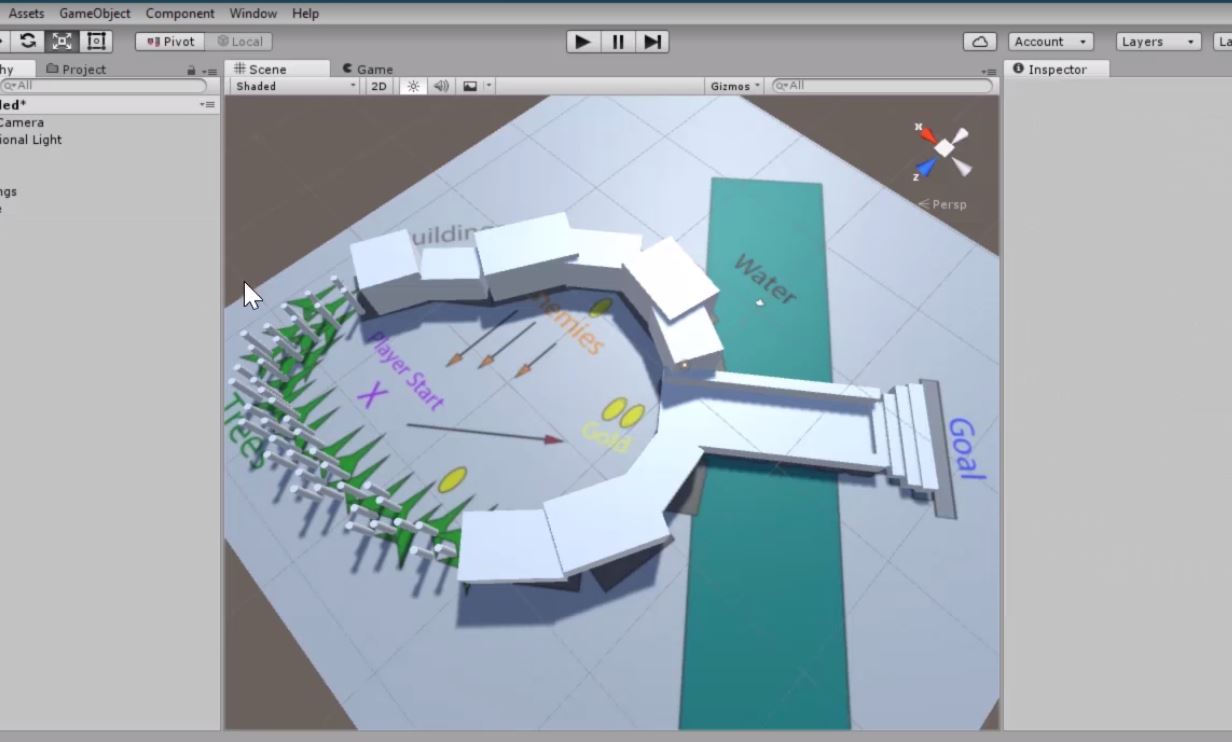
In Part 1 we will cover the process of Creating an Environment. The first step is to create a 2D layout which will be your plan for the level design, and you can do this with any 2D tool you are comfortable with - Photoshop, MS Paint, even paper and pencil!

It's important to create a 2D layout before beginning building in 3D because it allows you to explore multiple options, take a couple of attempts and make changes quickly, get feedback early, and also to have a plan so you can stay on track when you begin building.

Benefits of creating a 2D layout:

  • Explore multiple options
  • Make changes quickly
  • Get feedback early
  • Have a plan
When I'm getting started on a 2D layout, I like to start with the player's start location:
Then fill in some details around it:
Be sure to label everything as you add new elements:
And think about where to add interactions:
Be sure to add a clear and distinct goal:

Once you have a top-down layout, it's time to move into Unity. You can import your top-down layout into Unity and apply it to a plane and use it as a reference to build on top of. 


Be sure to scale it so it is an appropriate size compared to a character controller. Most character controllers are 1 meter wide, so you can use a unit cube to measure while you scale your layout. 

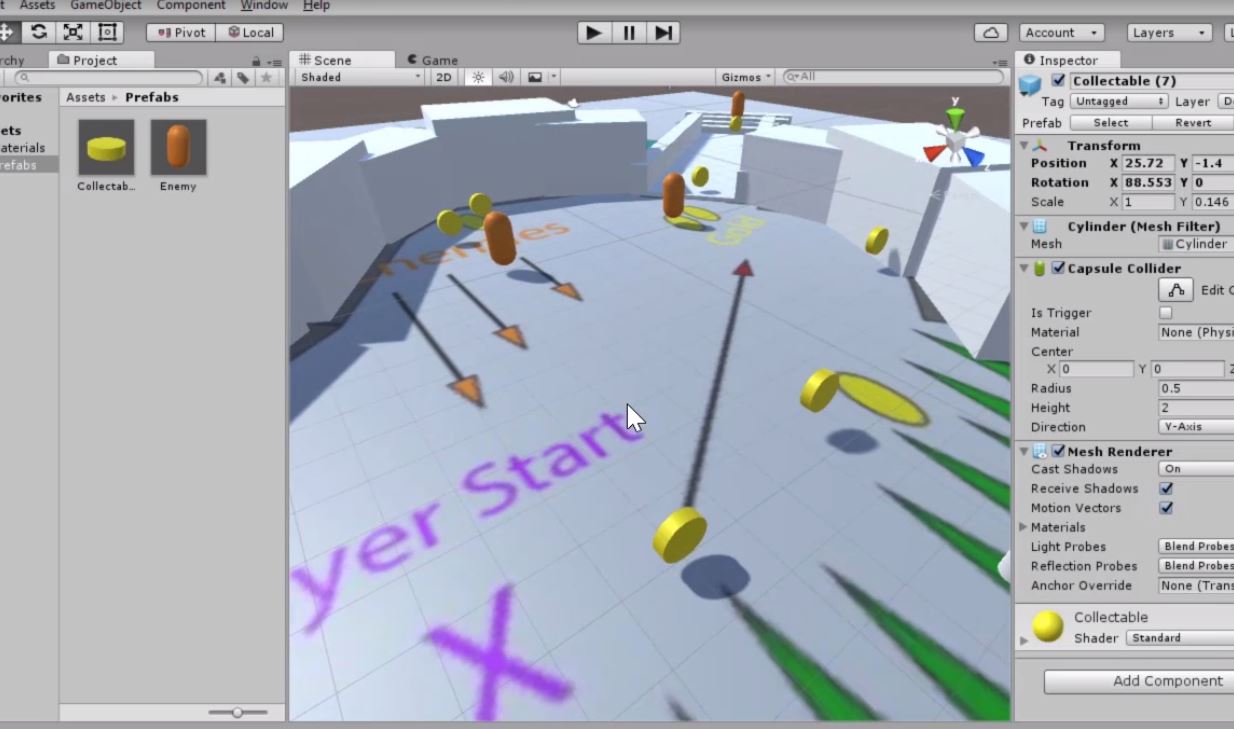
The next step is Whiteboxing - the process of building a layout using 3D primitives such as cubes, spheres, cylinders, etc. 


For any part of the layout that would be interactive, we want to create Prefabs which allow us to easily apply changes to a large number of objects at once and ensures that they have the same visuals and behaviors. 


Once you have your interactive Prefabs, you'll want to start placing them around the scene. Before you start placing though, it's important to give some thought to the Level Flow. You don't need to place your interactive objects exactly where you have them in the layout, this is the perfect time to try some different options and get a good feel for the progression. Level Flow is how the difficulty increases over time, and it can be tempting to use a linear increase:


However, a better approach is to add a challenge, followed by a moment of rest, and oscillate between increasing and decreasing difficulty:


It's important not to increase too quickly or you will cause anxiety, but you also don't want to increase too slowly or you will cause boredom. 

Once you have given some thought to your level flow, you can place your interactive prefabs in the scene. 


Be sure to test regularly as you are adding interaction points, to be sure that your level flow feels good. I recommend testing with Unity's default first-person controller during this phase. 

Now you have a whiteboxed scene in Unity. Part 2 will cover importing art and sound assets and integrating them into the whitebox. 

If you would like to follow along with the full video tutorial, please check it out on Pluralsight!

Tuesday, April 4, 2017

Mentoring Interns


In January I started hosting a team of interns at Astire Games, and it has been an awesome learning experience (for me and for them!)


This was not my first time leading a team, but it was my first time being the "final call" - the person at the top...and it was strange! Basically, at any point, if I decided to back out the whole thing would just disappear, it would cease to exist...a very surreal feeling. It took a while to get used to, and it also took a while for me to get comfortable making those final calls.


It wasn't until the final week of the project that I decided how much I should enforce the quality bar, and that also led to my toughest lesson - not everyone has the same quality bar! And it is unreasonable to expect interns or current students to hold themselves to the same quality bar as someone who has worked in the industry. I had a certain expectation of what the final quality would be, and I kept expecting it to get there and I was just sort of waiting for it to happen. I was continuing to give feedback, but I just kept expecting the quality to keep going up and at a certain point it seemed the quality improvement was peaking - it was no longer making large improvements, and I believe the reason was that the interns had reached their quality bar - they believed the game was "good enough to ship" and I did not feel the same, but how could they know that?

So, I put on my "mean boss" hat and told them the game was not good enough to ship, and that it would not ship if the quality didn't improve. It was a painful thing for me to say, especially considering how lax I had been for most of the quarter, and I was not sure what the reaction would be.


In this case things worked out, everyone started working harder and making major improvements anywhere I was giving feedback. In the future, I think a better approach would be to make the quality expectations clear from the start, and also to make publishing the game feel more like a reward - ie. if the game meets these quality expectations we will publish it!


I think it may not have been fair for them that I withheld my quality standards until the end, and that is something I hope to improve with future teams. I've sent offer letters to the next batch of interns and am excited to try again and do better starting next week!


The first team of interns submitted their game Out Foxed to iTunes, Google Play, and the Amazon App Store. Android versions are available now on Google Play and Amazon. iOS version is available on the iTunes App Store.


As always, thanks for reading :)

Thursday, December 29, 2016

Entrepreneurship, Success, and Impostor Syndrome (and Failure)

A note before reading this post:

I wanted to write an "end of year" post about all of the cool things I got to do this year, but as I started to write it I was filled with doubt...I didn't feel like my accomplishments were worth writing about, or that they should even be labeled as "accomplishments" at all.

So I decided to make this post a combination of my year in review and a look at Impostor Syndrome:

“The beauty of the impostor syndrome is you vacillate between extreme egomania and a complete feeling of: ‘I’m a fraud! Oh God, they’re on to me! I’m a fraud!’ So you just try to ride the egomania when it comes and enjoy it, and then slide through the idea of fraud.” – Tina Fey

Most of my blog includes what I consider to be useful information to the reader, however this post will focus much more on me and my work. I believe that anytime you write something you should consider what value it brings to the reader, so...why should you invest your time to reading about my personal thoughts? Well, first I hope this helps anyone else struggling with the same doubts and fears to know they are not alone, and second it may give you some ideas and inspiration for things you can go out and do. Most likely, everything I did this year is within your reach!

Entrepreneurship, Success, and Impostor Syndrome (and Failure)

Lately I've been tormented with feelings of doubt and uncertainty surrounding my startup ventures as an Indie Dev. In spite of the fact that I started a studio, released a couple of games, and hired a small part-time team, I still don't really feel like an entrepreneur, or even like an indie dev. Is Astire Games even a real studio? Is it a real startup? Am I really a founder? As a hypochondriac, I know with certainty that I have just about any syndrome I read about, but this was particularly true when I learned about Impostor Syndrome. No doubt in my mind, I have Impostor Syndrome.

Impostor Syndrome, for those who don't know, is the nagging feeling that no matter what you accomplish somehow you are faking it, and soon everyone will find out you are a fraud. Even as I reread the description of Impostor Syndrome, I began to wonder if I am even allowed to have it, because the prerequisite to Impostor Syndrome is having accomplished something. What have I even accomplished that would allow me to doubt those accomplishments?!?

I'm sure there are people out there who feel successful, but I am not one of them. There are three possible reasons for this - 1. because I am actually not successful, 2. because I have extremely high standards for success, or 3. because even though I have accomplishments that meet my criteria for success I am in denial of those accomplishments. As a person committed to reason and logic, I am willing to objectively assess the second two possibilities, even though my instinct is to believe the first one.

So, I am going to list out all of the good things that happened in my life in 2016 (in terms of my career) which I would consider accomplishments, or evidence of success, because the only way to objectively assess anything is with evidence. Towards the end, I also want to talk about learning from failure (and some heartbreaking failures I experienced this year and what I learned from it).

Successes of 2016

1. Founded Astire Games
This was just some paperwork and $20 for the DBA, however it felt really good to give a name to the company I was trying to start. The reason I consider this an accomplishment is because it was the first time I really committed to my goal of founding a studio. I said "I am doing this!" and then I signed the papers.

2. Moderated a VR panel at PAX South
I'd had a handful of friends speak on panels at conferences the previous year, and I was envious of their opportunity and bravery, so this year I submitted a VR panel to the PAX South conference and it was accepted in January. That was my first time moderating a panel, and my first time speaking at a major conference in my field (I had previously given a talk at Games for Health, but it was quite a small conference - but a good experience none-the-less). The VR panel was an amazing opportunity and I learned a lot from the experience - how to pick questions based on the audience, the importance of having extra questions separate from the core questions, and how to make sure all of the panelists have topics they are particularly interested in. It also gave me the confidence I needed to keep going out and giving talks.

3. Shipped Slapdash Bones for Android
This was my first self-published title and the first release of Astire Games. Though it was a small mobile game, it gave me the confidence to say "yes, I can publish my own games." It also resulted in Astire Games becoming a register Android developer on Google Play. The process to become a Google Play developer was not particularly complicated, it just took some time and focus to set everything up, and it felt really good when I was done.

4. Shipped Cat Cave for Android
My second self-published title and release of Astire Games, and the first game from Astire to be developed by a team! I rallied some friends - an Artist, Sound Designer, and Programmer - and set about organizing design documents and task lists, setting up version control, and monitoring the quality and giving feedback (as well as all of the level design, Unity integration, and a fair amount of gameplay programming). A lot went into this game, and when it was released I did a big push for promoting on social media, which was a learning experience in itself.

5. Guest lecturer at the DSGA
One of my alma maters, the DSGA at UT, invited me back as a speaker. This was pretty cool because I was actually invited by the students. They had very few non-male speakers throughout the year, so the students set out to find some in the last couple of months (although I do not identify as female, I am gender non-binary so I do identify as "non-male").

6. Accepted to Oculus Launch Pad
I submitted a game concept (very early idea that led to Sundown Arcadia) to the Oculus Launch Pad diversity summit and was accepted. They flew us all out to Facebook HQ for some hands-on training and to give us free hardware (a Gear VR complete with controller and Samsung phone).

7. Panelist on a VR panel at the Texas Women in Games Con
One of my panelists from PAX South recommended me as a speaker on a panel he was moderating. It was similar content, but exciting to hear new perspectives and to have a turn as a panelist instead of a moderator.

8. Shipped Cat Cave for iOS
I decided it was time to go cross-platform and start releasing my mobile games for iOS. Becoming a registered Apple developer was far more complicated (and more expensive) than becoming a Google Play developer, but it allowed me to reach a much larger audience with my game.

9. Cat Cave was reviewed by several Game Reviewers
The first time a game review site approached me and asked about writing a review for Cat Cave, I was over-the-moon with excitement. We ended up getting 3 reviews published on review sites and one video review on Youtube.

10. Left my AAA day-job to run Astire Games full-time
You might be wondering why this is an accomplishment. Well, it takes a lot of courage, confidence, and energy to leave a reasonably well-paying job doing something you enjoy, and it is very scary to leave that job and jump into the unknown. I had no idea what I was getting myself into, and I still don't!

11. Ran a 2-week summer camp for high school kids learning to make games
This was probably my proudest moment in 2016. I had to assemble the curriculum, plan lectures and assignments, and decide how best to approach a topic I am familiar with for an age group I am not familiar with. And then running the camp day-to-day: 8 hours a day for two weeks, watching them create amazing content, taking them to lunch, playing games, trying to keep cliques from forming...It was an incredible and exciting challenge. Then at the end watching them show their games to their parents!

12. Hired contractors to work on Cosmos Arena
My first time paying people to work on my game! Granted, not very much. But still, it was a cool process, and it gave me a chance to step back a little and watch the work come together without being overbearing on every aspect of the project.

13. Was the featured speaker at a Unity Women in Gaming workshop
I was flattered when Unity told me they were coming to Austin to give a workshop and asked if I would like to be the featured speaker. The workshop was for current college students who want to work in games, so I prepared a talk on the different areas within Game Design, and how designers work together and with other disciplines (design is the least-defined discipline in game development).

14. Moderated a VR panel at PAX West
This was the same panel I moderated at PAX South, but for a much larger and more prestigious conference.

15. Sundown Arcadia accepted to the Austin Game Conference Intel Showcase
Intel had an online submission form for indie games, and I submitted my Gear VR game Sundown Arcadia. I was one of the 10 selected to pitch and present a game at the Austin Game Conference.

16. Sundown Arcadia awarded "Most Innovative" by Intel Showcase judges
Of the 10 games pitched at the Austin Games Conference, Sundown Arcadia was one of the 4 chosen for awards. The award it won was for "Most Innovative" because it was completely gaze-based. It also led to me forming a relationship with the Tobii Eye Tracker team, who wanted me to port my game to their platform.

17. Nominated as a faculty "All Star" at the Art Institute where I teach
Every quarter the Art Institute holds nominations for "All Star" students and faculty, and I was honored to be nominated as a Faculty All Star for the Summer Quarter.

18. Pitched Sundown Arcadia to Oculus and Sony reps at IndieCade
I was lucky enough to get an Indie Xchange pass to IndieCade from a friend who wasn't able to go, and that gave me the opportunity to set up meetings with publishers. Oculus and Sony both had reps there, so I set up a meeting with each of them and I got 5 minutes to pitch them my game. It was very intimidating!

19. Credited on two shipped AAA titles (COD: MWR and Mafia III)
In my time at Certain Affinity I worked on two different AAA titles, and both shipped around October this year. Scrolling through the credits and seeing my name really made me feel like my hard work was worth it.

20. Speaker at Unite LA on Interface Design
My first major conference solo talk, and also one of the best talks I think I've ever given. You can watch it here.

21. Hired a team of interns
A few weeks ago I announced to my students that I would be running a small internship program as part of Astire Games, and would publish any reasonably high-quality work created by those interns. Over the past couple of weeks I have been accepting resumes and portfolios, and the review process was pretty tough. I discovered that it was fairly easy to judge artists and designers by their portfolios, but for scripters I needed a little more to work with, so I made a simple scripting test. After reviewing all of the applicants, I selected a team of 6 interns who will start working in January. One thing I felt was really important after reviewing the applicants was giving feedback to the ones I did not choose - this is not very common of job applications, but since many of them are my students I want them to improve on their job application process.

Failures of 2016

Without evil, there can be no good. We do not recognize our happiness until we have felt sadness. And so, to appreciate success we must acknowledge our failures.

1. Cat Cave downloads did not meet expectations
I went into the Cat Cave release with high hopes, and figured that since I went through rigorous social media promotion I could hope to get at least a thousand day-one downloads. Cat Cave total downloads to-date hovers just below 400 (including both Android and iOS). Lesson learned - promotion is not enough to get your game out there. Sadly, I still don't know what is the right approach here. Make a better game I guess?

2. Panels rejected for GDC
After my successes with other VR Panels I thought I would have a good chance to get a VR panel in to the biggest game conference - GDC. That did not pan out, in fact we didn't even make it to the second round of reviews. In case the VR section of GDC was too saturated, I submitted two other talks in other areas, and both of those were rejected as well. I do not think my talks are not high enough quality for GDC, but I do think I need to re-evaluate how I approach the submission process.

3. Not selected (or even reviewed) for Oculus Launch Pad scholarship
This was quite a disappointment since my Sundown Arcadia pitch was doing so well at other places. The Oculus Launch Pad I mentioned earlier offered a scholarship to fund full development of a few of the games in the Launch Pad. There was a complication with my submission - I joined a roller derby over the summer and had a bad injury just a few days before the submission deadline which made it impossible for me to use my right arm (I could not even hold a mouse). I asked for an extension so I could record my video and type up my submission (my playable demo was nearly done at that point, I just needed to finish the submission). They granted my extension, I submitted, I was told it had been included in the submissions for judging, and I thought no more about it for a couple of months. They had some change of staff before announcing the winners, and I decided to ask about my submission. The new people told me that since my submission was late they had removed it from consideration and it had not been reviewed. I told them about the extension, but they either did not believe me or did not think I deserved an extension, because they said they would still not be reviewing it. What I learned from this - don't trust anyone. Just kidding, what I really learned was to get things like that in writing because of the likelihood someone else won't believe it (I also learned that Facebook messenger does not count as "in writing").

4. Unable to find Client Work
I have a handful of contractors working off-and-on with Astire Games, and I would really like to get a client contract project going so that I can have work for my contractors that I can actually pay them for. I've applied quite a few places on Upwork and Unity Connect and have also been asking around people I know in the industry, but so far nothing has panned out.

A Year in Review

2016 was probably my most successful year in terms of my career. The failures I had I believe I can work on and do better next year when I try again. The only real way to fail is to stop trying. Teaching is going well, Astire Games is going strong, and beginning in 2017 I plan to form an LLC. I also think 2017 will be the year I start looking for investors in my studio.


Wednesday, October 26, 2016

Interface Design and Unusual Platforms, Part 3

This is the third and final installment of Interface Design and Unusual Platforms. If you haven't read the first two, please start here.

The first two posts were about the incredible variety of hardware available, and how each one provides a unique source of input from the user. In all of my design work I like to start with answering the question "what is unique about this hardware, and what can I do with it that I couldn't do with any other hardware?"

This post will be focused on what I would argue are the two most common pieces of "unusual" hardware - mobile and VR - and how we as designers need to step away from the mindset of designing for mouse and keyboard.

Not long ago I played a VR hangman game where the user would fill in the hangman letters using a digital keyboard floating out in space, and would reach out with their motion-tracked controller to "click" on the keys using the trigger on the controller. There are many VR experiences that attempted to have the player "click" on things in the world, however this interface fell victim to using BOTH a mouse input and a keyboard input. Now I'm not sure if hangman is the best use of VR, but I am certain there is a better option out there than having the player click on letters from a digital keyboard.

On the complete other end of the spectrum is a game called Fantastic Contraption, which was popular many years ago but recently ported to VR. In this game, every action you can take is about the physical space around you - switching between tools and items happens by reach with the motion-tracked controller to various parts of your body, and this makes it easy to remember where things are - "this tool is always behind my right shoulder." Fantastic Contraption also has an adorable "living" menu in the form of a cat that follows you around in the game. Have a look for yourself:


Another thing to keep in mind with VR is that almost any kind if input from the user's hand has the risk of feeling unnatural. If you are using the motion-tracked controller to place a digital hand over something and then pull the trigger to pick it up, many users feel unnatural because the shape and texture of the object they see does not match the shape and texture they feel in their hand.

One of my games addressed this by not using hands at all - every interaction is completely gaze-based. Not only does this eliminate the unnatural feeling, but it also plays on a common human fantasy of being able to alter the world with your mind - staring at things to make them explode. You can see the demo video:


Mobile games have faced similar mouse-and-keyboard tendencies, and have also come up with some inventive alternatives.

One of the first issues that comes to mind for me is when a game has the user tap on something to select it, and then tap somewhere else to move it there. This is a common interaction with a mouse, but on a touch screen it makes so much more sense to drag it across the screen to the new location, because that is how we would move things in real life.

Another issue on mobile which isn't a problem with mouse-and-keyboard is that if something is on the top-left corner (or top-right corner for left-handed users) then the user's hand will be completely blocking the screen when they try to touch it.

Some of the more intuitive interactions include the two-finger pinch and stretch to zoom in and out, which I believe may have been genius when it was first used. And that one must have taken a fair amount of pondering, because there is no comparable interaction with the mouse and keyboard - it was completely unique to the touch-screen.

Most interactions where you swipe across the screen are also fairly intuitive, especially when you swipe towards the edge of the screen to throw something away. There is a VR equivalent to this which you can see in Job Simulator where the user throws objects toward the edge of the space to discard them.

I think that part of the reason why we end up stuck in the situation of defaulting to mouse-and-keyboard controls is because the majority of games are developed on a computer using the mouse and keyboard regardless of what platform it will end up on, and sometimes it takes a while before the developer is able to test on the target platform, and by that time the developer may have already gotten comfortable with the controls so it is intuitive for them and they don't notice the problem. We might see this improve somewhat when VR developers can start developing their games while inside VR, a solution some of the bigger game engines are releasing.

So, next time you are developing for anything other than mouse-and-keyboard, here is a challenge for you. Before you make any interactions or think about any kind of input, first think about what things are going to happen in the game - what is the in-game player going to do - then imagine yourself using the target hardware, or go and use it with nothing running, and imagine making those in-game interactions. Go ahead and pick up a blank phone or put on a dark VR headset, and close your eyes, and feel the interaction with the hardware.

Thanks for reading! Feel free to leave thoughts and suggestions in the comments - especially if you have examples of interesting interfaces for interesting hardware (both good and bad). Also subscribe and follow :)


Interface Design and Unusual Platforms, Part 2

This is a continuation of part 1, and I would recommend reading that first for some background info.

My last post left off with the Wii Fit Balance Board and Kinect for a game played on hoverboards battling giant robot spiders. How can I possibly top that?
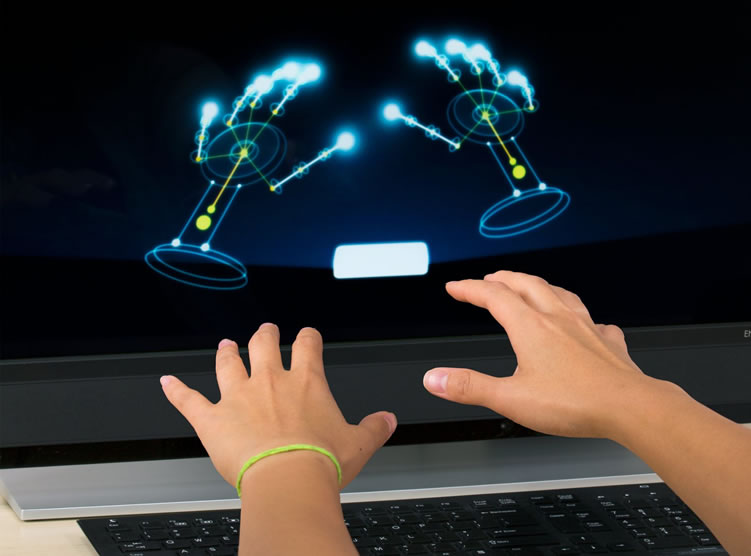
Well, up next is the Leap Motion (not to be confused for AR company Magic LEAP) - it bears some similarity to the Kinect in terms of hardware, but it is used to track your hands with great detail...every movement of every finger mapped to a skeleton!


I entered a Leap Motion Game Jam to get a free Leap Motion (one of the best ways to get free hardware!). As always I started with the question of "what makes this hardware unique and what can I do with it that I couldn't do with any other hardware?"

Other games have tried to simulate gardening and farming, but their shortcoming is that growing plants really involves working with your hands, something hard to replicate in video games using a keyboard or controller. The Leap Motion is unique in that it allows you to use your hands with the full range of dexterity we have in real life. So I made a garden simulator. It’s important to remember though that digital experiences do not need to perfectly match their real-world inspiration, sometimes it can be more fun to do something weird. So I took a weird twist on gardening - the player's interaction is to literally pinch and pull the plant upward to make it grow. Then you can dip your hand in a water bucket to sprinkle the plant with water to make it bloom. But beware! If you pull the plant to quickly you will pull it right out of the ground!

I ended up making this game in about 24 hours, because I procrastinated until the very last moment to get started. Here is a gameplay video. This one you can also download from itch.io if you have a Leap Motion and want to test it out!

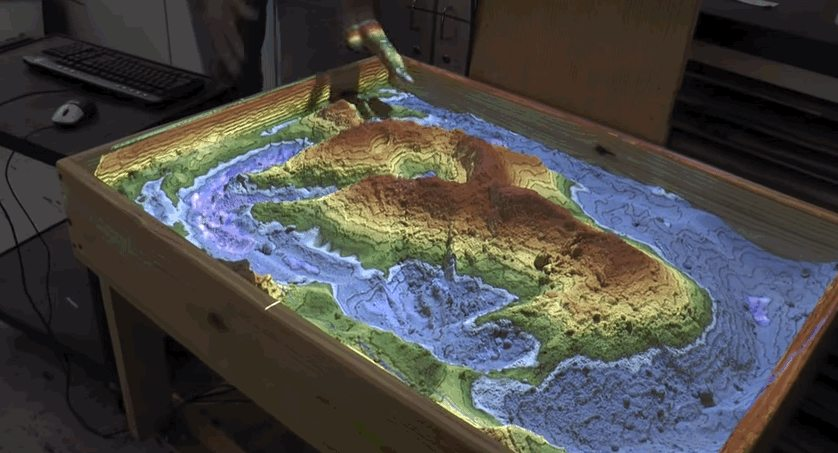
Of course I'm going to get to Virtual Reality, but one more thing before I do - Augmented Reality. I haven't actually made anything for Augmented Reality yet, but this stuff is crazy cool. It basically covers any way hardware can be used to alter your experience of real physical space, including overlays with AR glasses, digital displays on top of real-world camera usually using a phone, and of course projections like this one:


This is a height-map projector, it projects a different color based on how close the surface is to the projector. I had a chance to play with one of these recently, and it's great - you can play with the sand with your hands and build mountains and valleys and lakes, and the colors update in real time as you play. 

AR Games very commonly refer to two different types of games - Augmented Reality, which I was just explaining as being digitally overlayed on the real world, and Alternate Reality - which is like a parallel universe with the same global coordinates as our universe, but is instead inhabited by Pokemon. 


Okay, so now we can finally get to Virtual Reality, I'm sure that's what you're all here for. I'd like to take this opportunity to draw a distinction between Head-Mounted Display (HMD), Head Tracking, and full VR headsets.

A Head-Mounted Display is like a monitor attached to your face - it's pretty cool that it lets you get up close and personal, but the limitations without head-tracking means you are looking at a fairly stationary display.


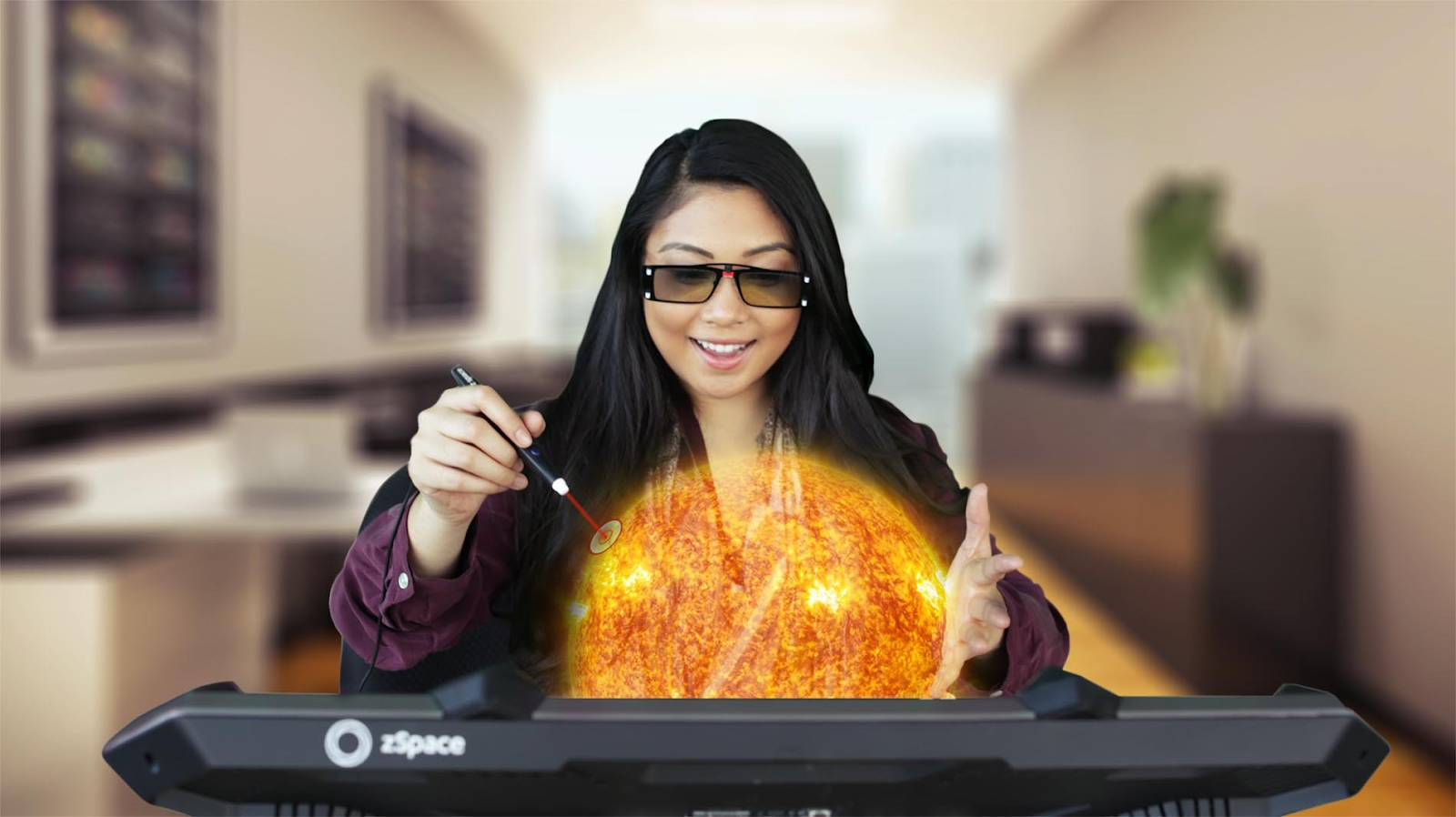
Head-tracking is similar to other forms of motion tracking (hand-tracking, body-tracking, motion-tracked controllers...). Head-tracking does what you'd expect - it tracks the motion of your head and then uses that data for something useful in the experience. zSpace, which I mentioned earlier, utilizes head-tracking to create the illusion of a holographic display, though the glasses are clear so you are still seeing the real world when you look through.


A full VR headset combines head-tracking with a head-mounted display to allow you to move your head around and experience a virtual world as if you were embedded in it.


Virtual Reality offers some pretty amazing opportunities for developers, because it is very unique from the traditional gaming experience. Moving your head around in physical space is so completely different from using a mouse to pan your view on a 2D monitor, and stepping forward with your feet (in room-scale VR) is quite different from using WASD to update your position in the digital space.

In some sense we should be thinking about the interface for VR the way we think about the interface for mobile.


It took a while for developers to realize some amazing things about the touch-screen interface. In the early days people thought about touch-screens in terms of mouse-and-keyboard controls, where buttons on the screen would be clicked on with a mouse they would instead be "tapped" on with a finger for the touch screen. But touch-screens offered a really incredible advantage over mouse-and-keyboard, which we discovered when we learned that toddlers could intuitively interact with a touch-screen, long before they could use a mouse. Part of this obviously comes from dexterity, but I think there is another key reason for this in that moving a mouse has a disconnect between your action and the result you see - you move a physical object around on a surface, and then you see a result happen on a separate physical object which is the computer screen. With a touch-screen there is not disconnect, the thing you are touching is the thing that displays the result of your touch, so it is much more intuitive to understand the relation between your action and the result. 

VR offers a similar solution for navigation, where we previously used a mouse and WASD to navigate a space, now we can use our head and body, which is a much more intuitive translation.

In part 3 of this segment I will get into the meat of my presentation - how can we stop thinking about the mouse and keyboard when we design for mobile and VR (and mobile VR)?

Continue to part 3.