Showing posts with label game dev. Show all posts

Saturday, April 10, 2021

Multitasking: Human vs Machine

Here on earth, humans are the only species (as far as we know) that has attempted to study its own brain. Much of our brain has remained a mystery for the majority of our existence, but relatively recently we've begun to understand some things that seem unintuitive. 

For decades we pushed ourselves to get more and more done, often resorting to multitasking, which seems on the surface like a great way to get more done - do more than one thing at a time!

Turns out, our brains don't work that way. By attempting to do more than one thing, our ability to do either of them diminishes, and ultimately both tasks take much longer and are not done as well. 

So, multitasking does not get things done faster. By and large, we've come to accept this shortcoming as a species (though there are still many who will try to defy what nature has shown us). 

There is something out there, though, that is great at multitasking. A machine, which by definition is a mechanical apparatus designed to accomplish a specific task, can do one task really well. Put two machines next to each other, and now we've got some magic. Take a look in your kitchen, with the fridge next to the stove, simultaneously keeping most food cold while making some food hot. 

Now, we as humans may not be able to do multiple things at once, but by strategically assigning machines to automate certain tasks, we can in fact accomplish many things. 

If you've read my blog before you know that I am a game developer, so I will give a game dev example here. There are some steps of game development that are inherently time-consuming, but you don't need to be particularly attentive for. Take baking lighting, for example. I recently needed to test some light baking settings, and I could see as soon as I started it that it would take a while, and I would need to check on it periodically because I wanted to test more than one setting. 

So, I started the light baking, got up from my computer, went to the kitchen. I pre-headed the oven, assembled some ingredients for a casserole, and set a timer. Then I returned to my computer to check the results and launch a second test. 

By leveraging the power of machines, I managed to bake lighting while baking a casserole, accomplishing two tasks at once. 

Thursday, October 10, 2019

Teaching Game Dev as a Generalist

I’ve been teaching game development at the University level for a little over 4 years. As a generalist, I’ve taught a pretty wide variety of classes, from Level Design, to Scripting, to VR Design, to Project Management.

During the summers I often run summer camps for high school students, and during those camps I teach the full pipeline - concerting and iteration, sketching and planning, creating art assets (modeling, texturing, rigging, animating), world building, scripting, and integrating art/sound/VFX.

I remember my college days where I was told being a generalist was a bad idea, and that if I wanted to be successful I needed to choose an area to focus. Although most of my jobs have not utilized all of my skills, I have never struggled to find work in the game industry, and many of my employers have appreciated my ability to jump seamlessly into other roles when needed.

At my current University, the topic often comes up in discussion among faculty of how to get our students to focus, to keep them from becoming generalists.

Here’s my two cents - if you can code, you will always have that to fall back on, there will always be someone who will pay you to write code.

If you can make art, you will always be able to bring your ideas to life. There may be times when it will be hard to find someone to pay for your art, that comes with the territory, but that shouldn’t keep you from creating great things.

If you can lead a team, you will find ways to do so, even if you are not formally given positions of authority.

Don’t shy away from being a generalist, if you are passionate about many different things, lean into that passion and become great.

On the other hand, if you have strong skills in one area and no interest in strengthening the other areas, then by all means specialize. Being a generalist is not for everyone, and many game studios rely on having very specialized skills on their team.

Tuesday, March 5, 2019

Patrolling Enemy Tutorial


One of the most-requested features I get asked about in the Game Design classes I teach is how to make a patrolling enemy that will "spot" the player. I've been making a lot of video tutorials lately, but for this one I've decided to make a text tutorial. So here it is, how to set up a basic patrolling enemy that will "spot" the player.


Patrolling Enemy
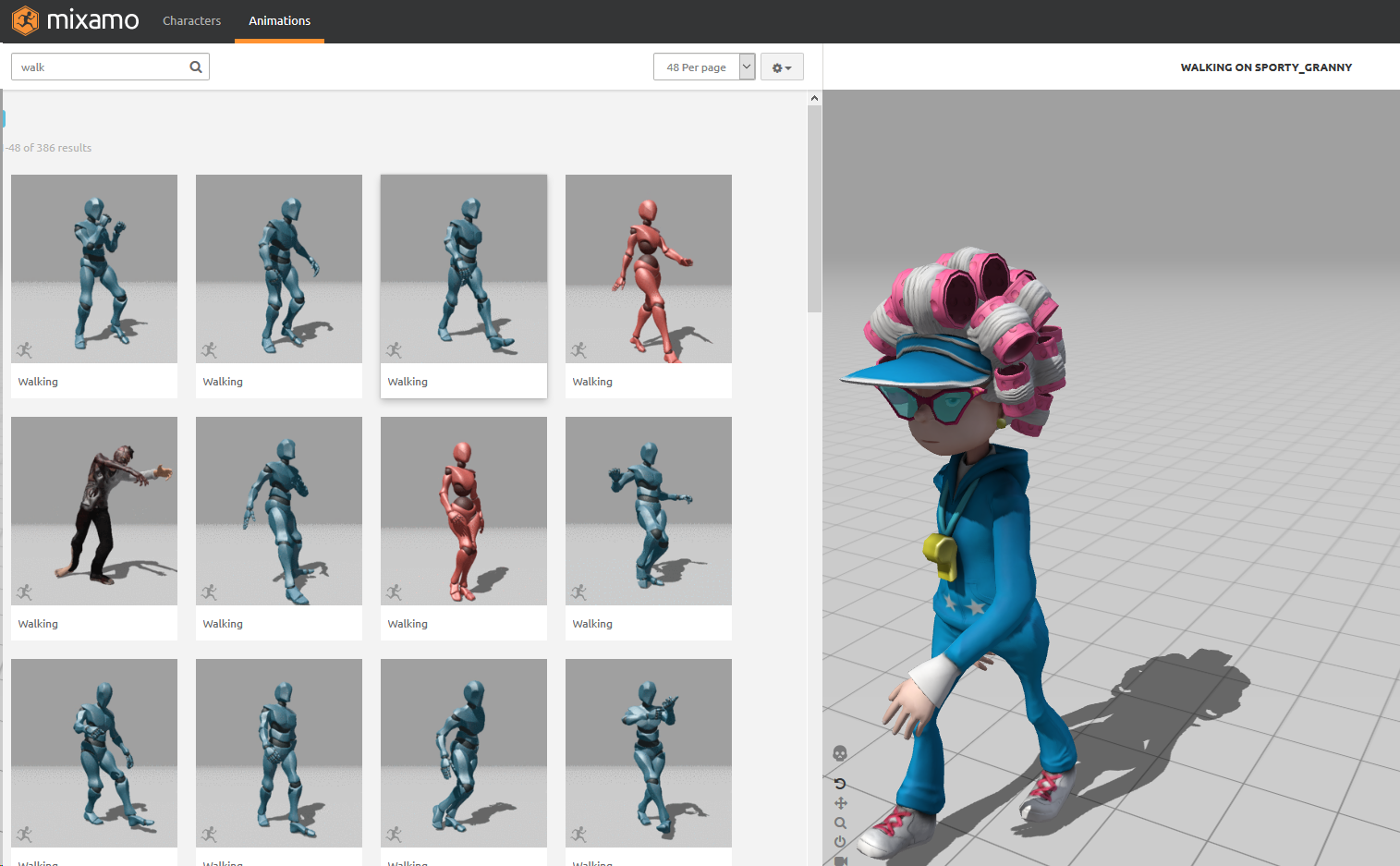
Download Enemy Character and Animations from Mixamo
  1. Log in or sign up
  2. From the Characters tab, select a character you like
  3. From the Animations tab, select a walk cycle
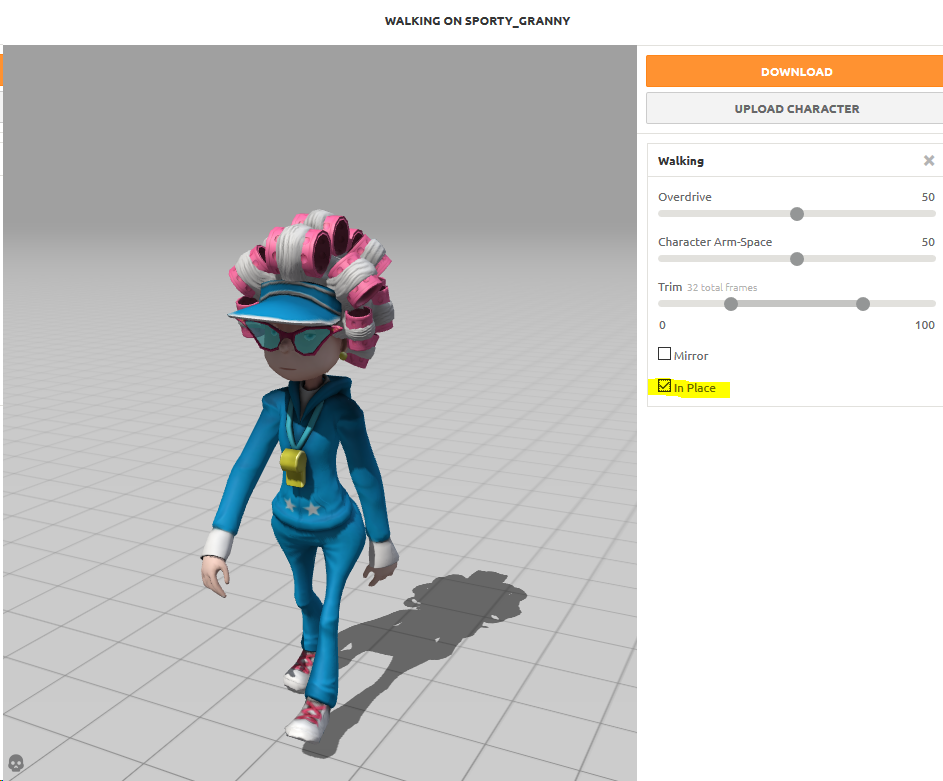
  4. Check the box for In Place
  5. Download as FBX for Unity
  6. Download a second time for Collada, which gives a .zip folder with the texture files
  7. Find a second animation, such as an Attack, and download as FBX for Unity
  8. Import the FBX and the texture files to Unity
Setup and Bake NavMesh in Unity
  1. Create a Ground Plane in a new empty scene
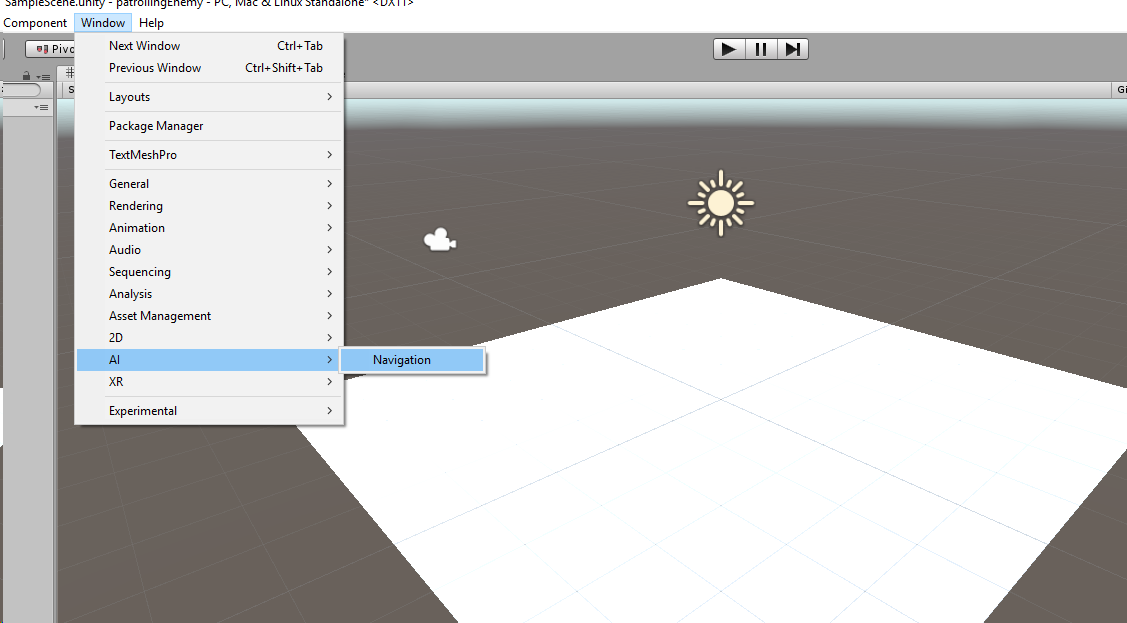
  2. Open the navigation panel: Window > AI > Navigation
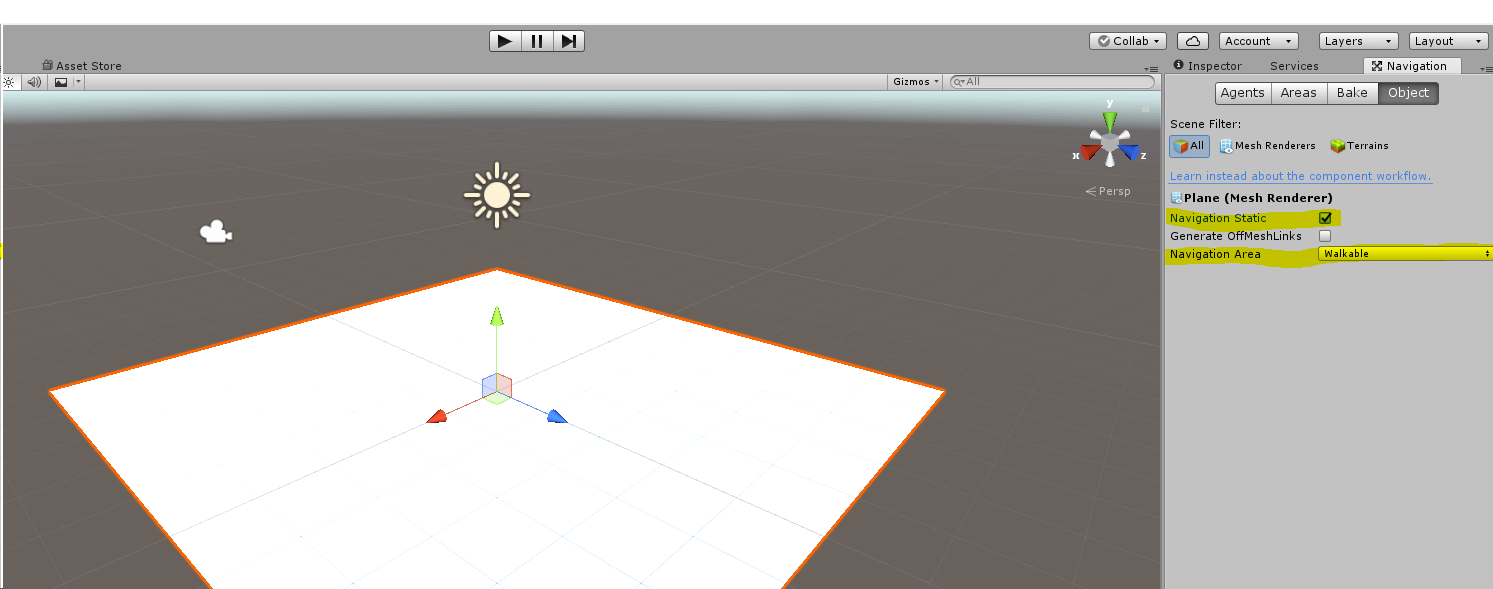
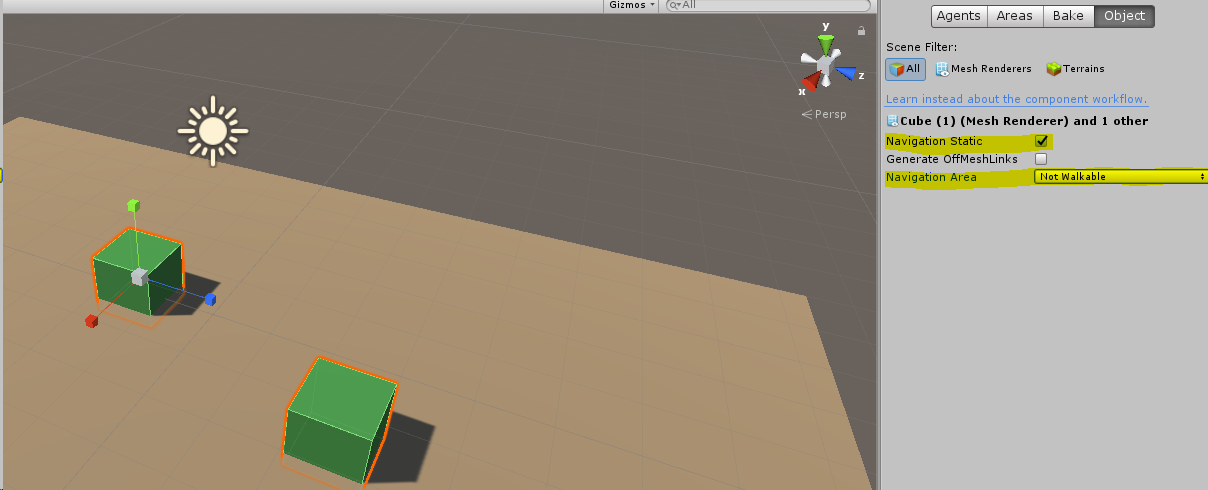
  3. Select the Ground Plane and mark it as Navigation Static and Walkable
  4. Create some obstacles for the enemy to walk around, it’s a good idea to change the color of the ground and obstacle so you can see what you’re doing
  5. Marke the obstacles as Navigation Static and Not Walkable
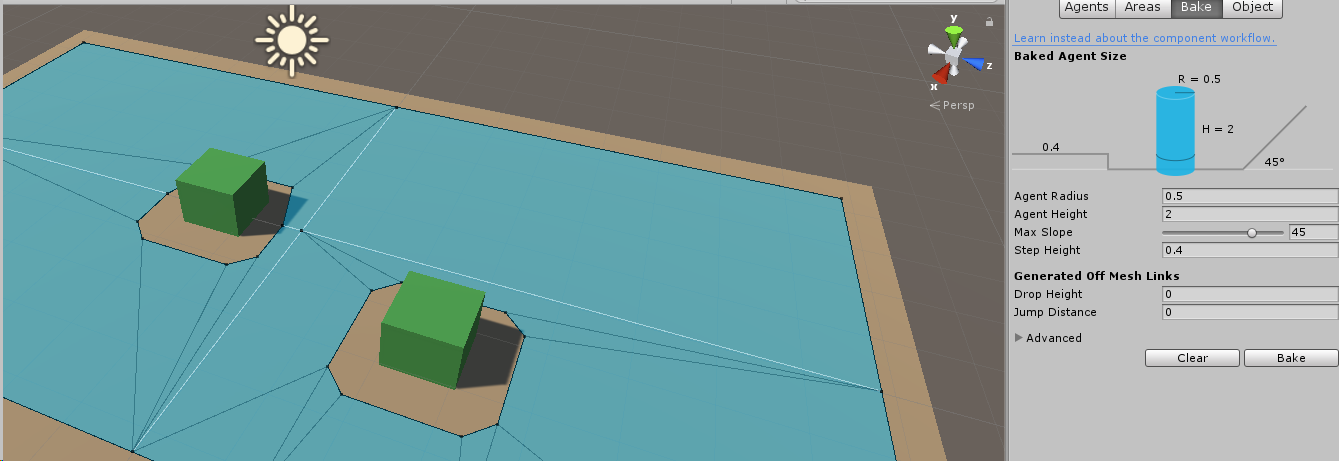
  6. Select the Bake tab and choose Bake
Create NavMeshAgent and Player Character Controller
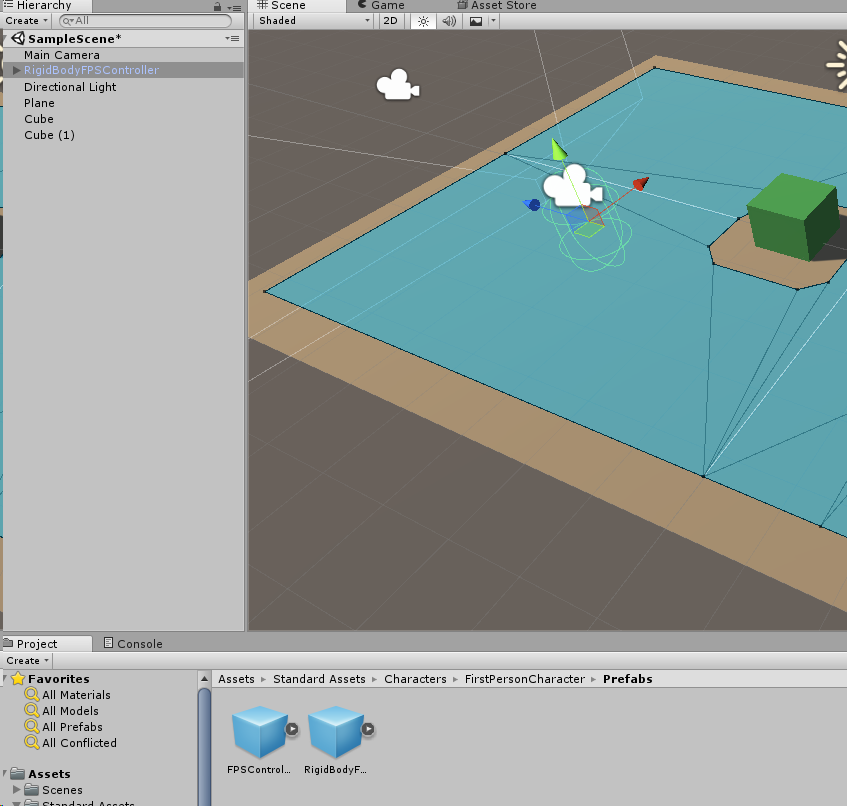
  1. Create a Character Controller for the player, or download the Unity Standard Assets FPS controller and place it in your scene (if using the FPS controller, be sure it is above the ground)
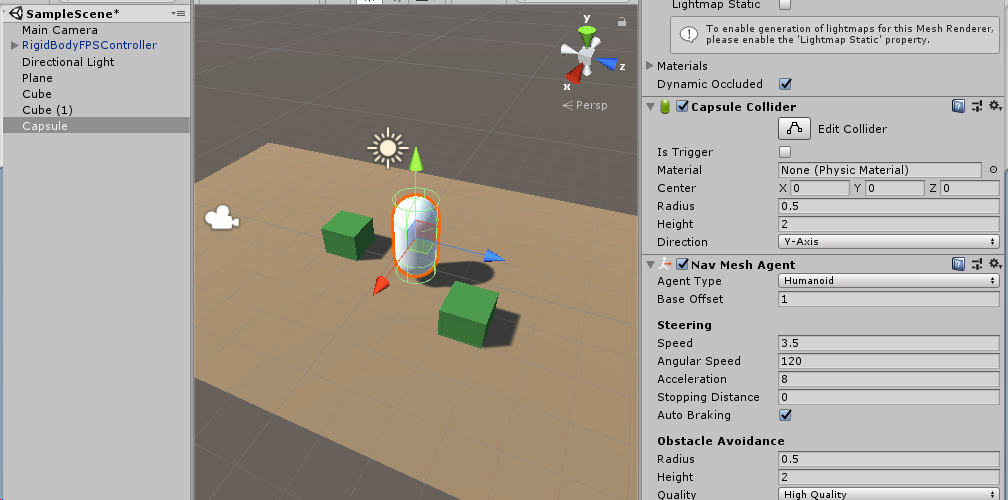
  2. Create a 3D Capsule object in your scene and give it a NavMeshAgent Component
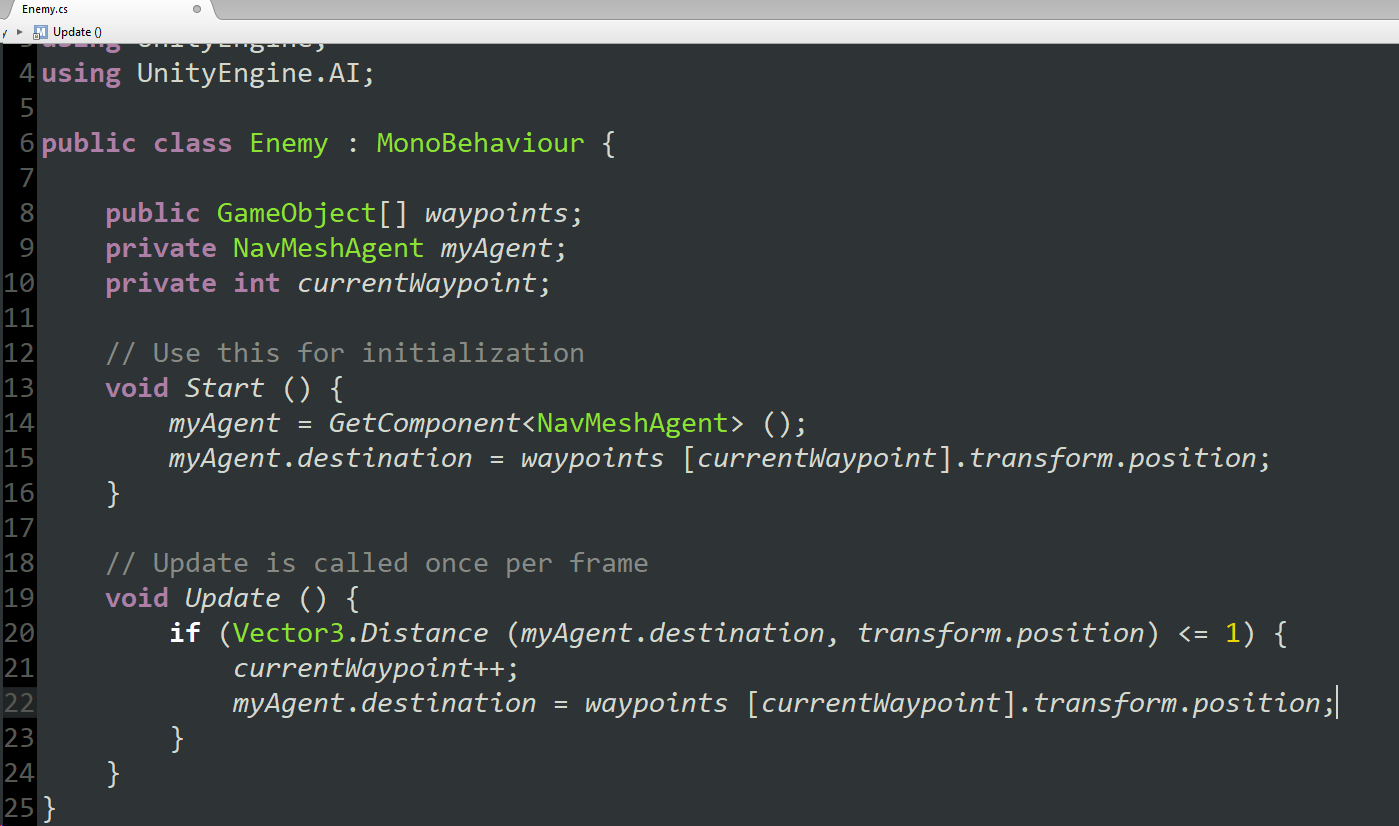
  3. Create a new C# Script called Enemy and attach it to the Capsule
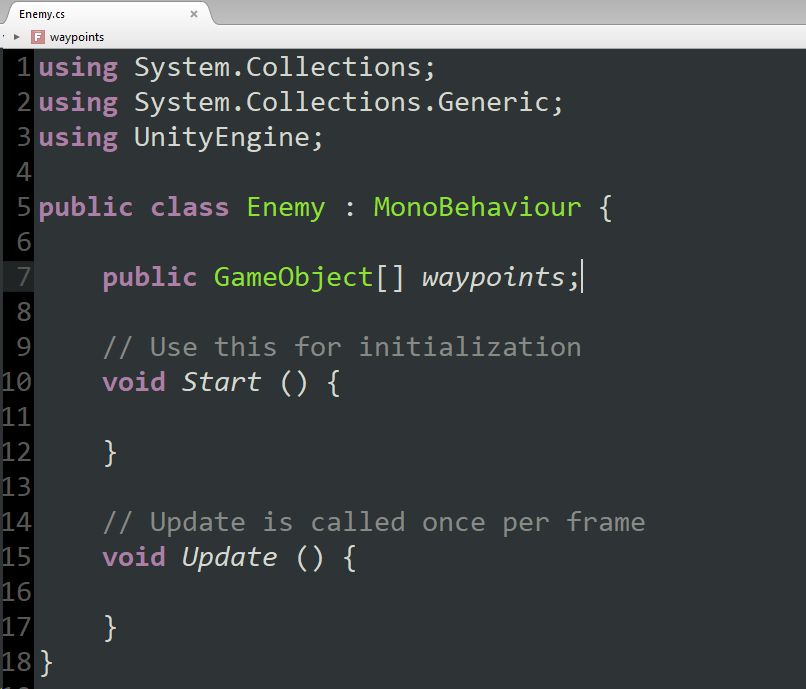
  4. Open the script and create a Public Array of GameObjects
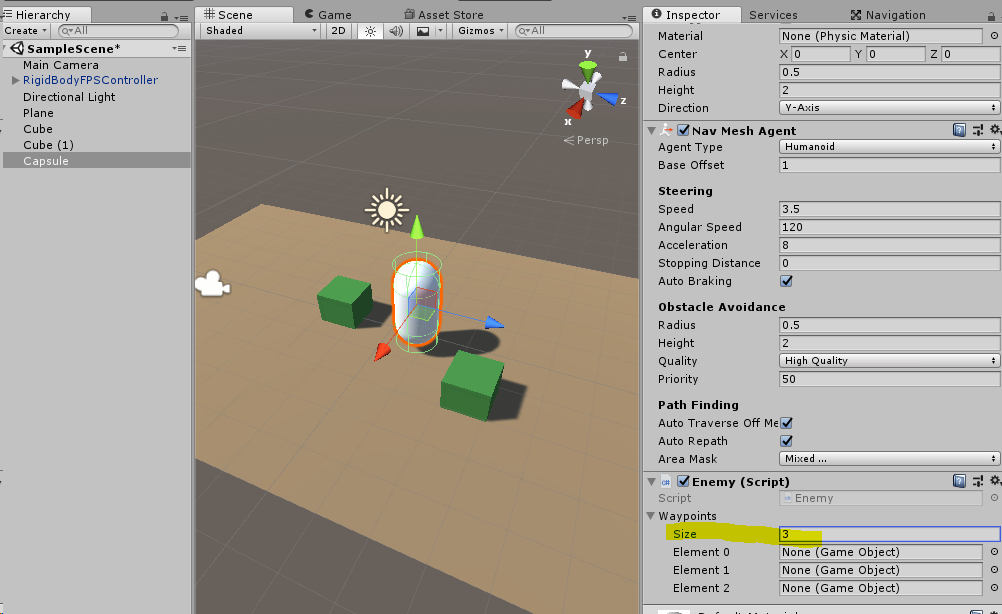
  5. Back in the Unity scene, select the Capsule and set the public array size to 3
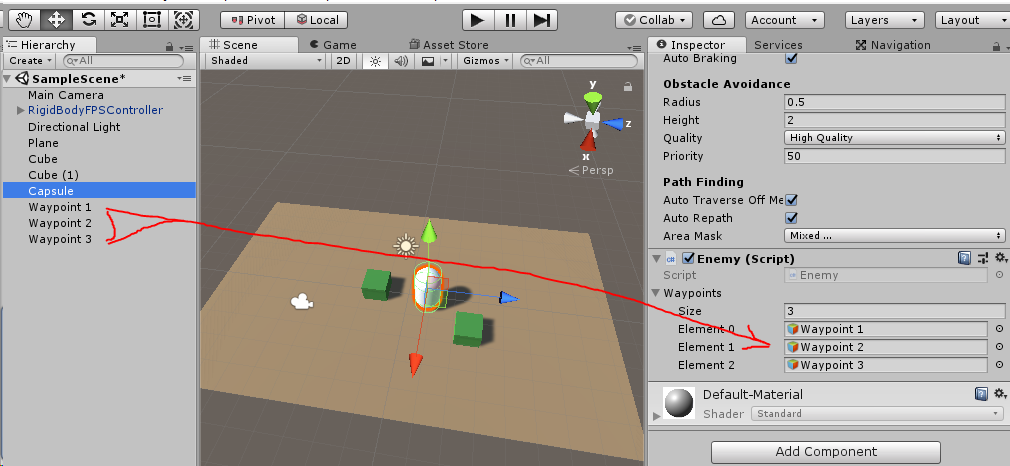
  6. Create 3 Empty GameObjects and place them around the scene (these will be the waypoints for the enemy to walk to)
  7. Drag each of the waypoints into one of the GameObject slots on the Capsule
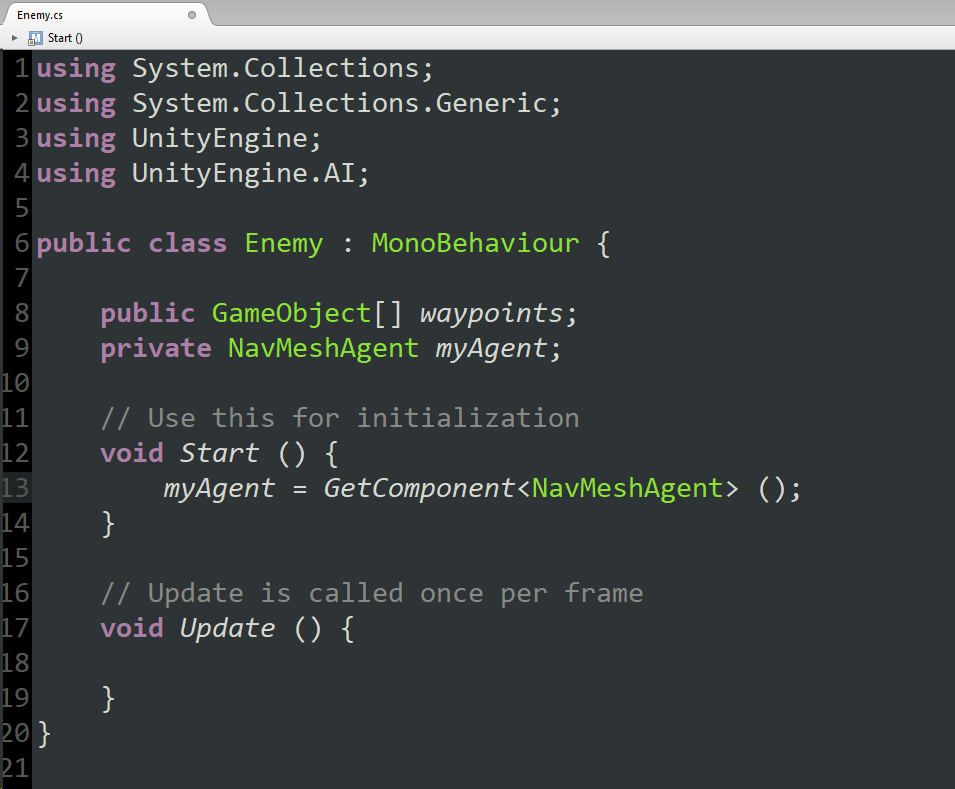
  8. Back in the Enemy script, add using UnityEngine.AI to the top of the script, create a private NavMeshAgent and in the Start function give it a reference to the NavMeshAgent component
  9. Create a private int to keep track of the current waypoint, then in the Start and Update functions specify the desired waypoint for the NavMeshAgent.destination
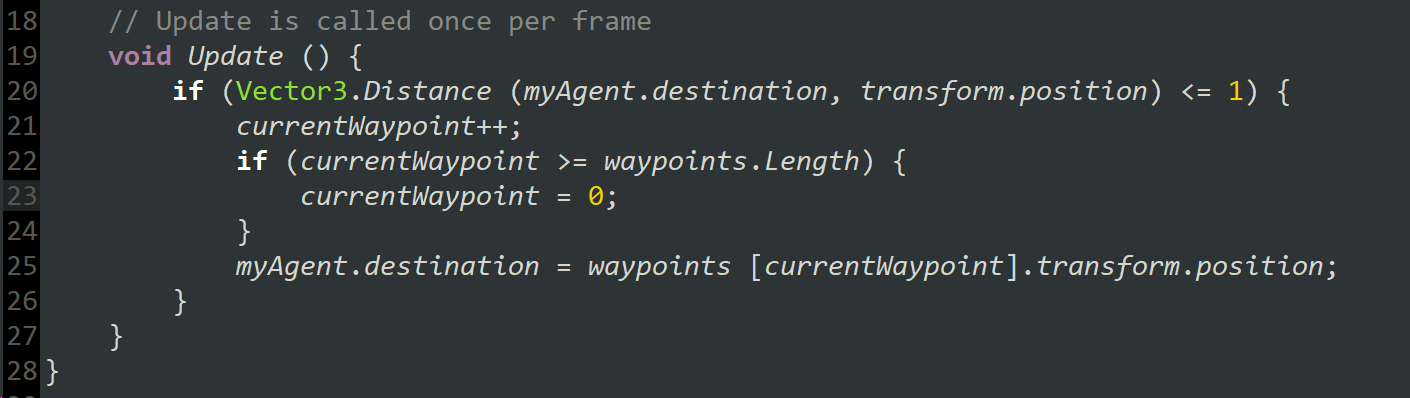
  10. Save and test and you will see the enemy walk between each of the waypoints until it reaches the end of the patrol path...update the script so the patrol loops by resetting currentWaypoint to 0 when you reach the end
  11. Test again to ensure the enemy loops on the patrol path
Link Character Model and Animation to NavMeshAgent
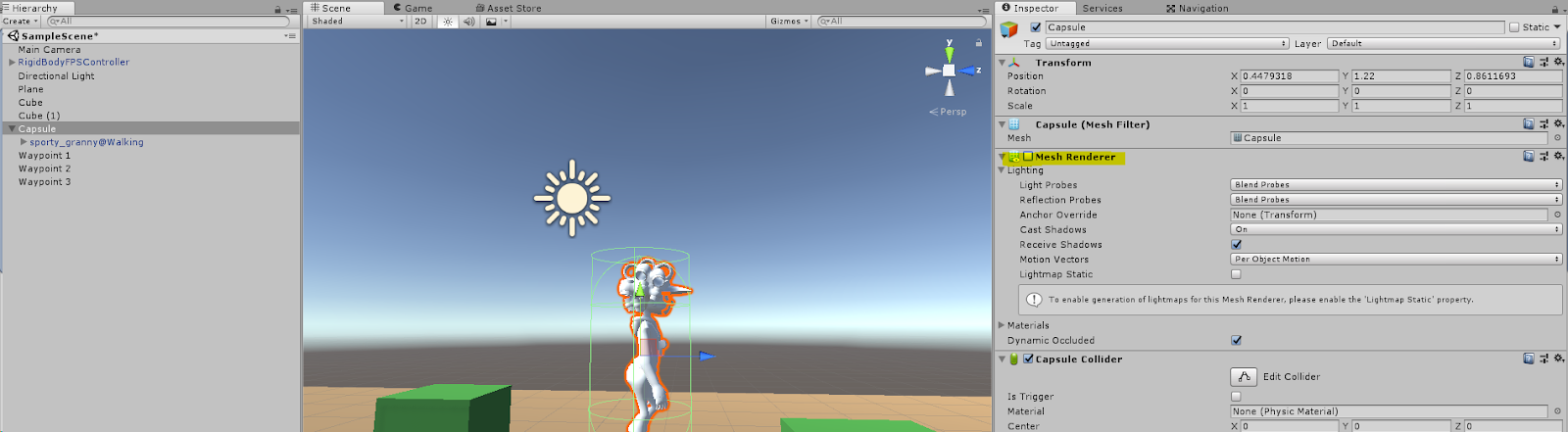
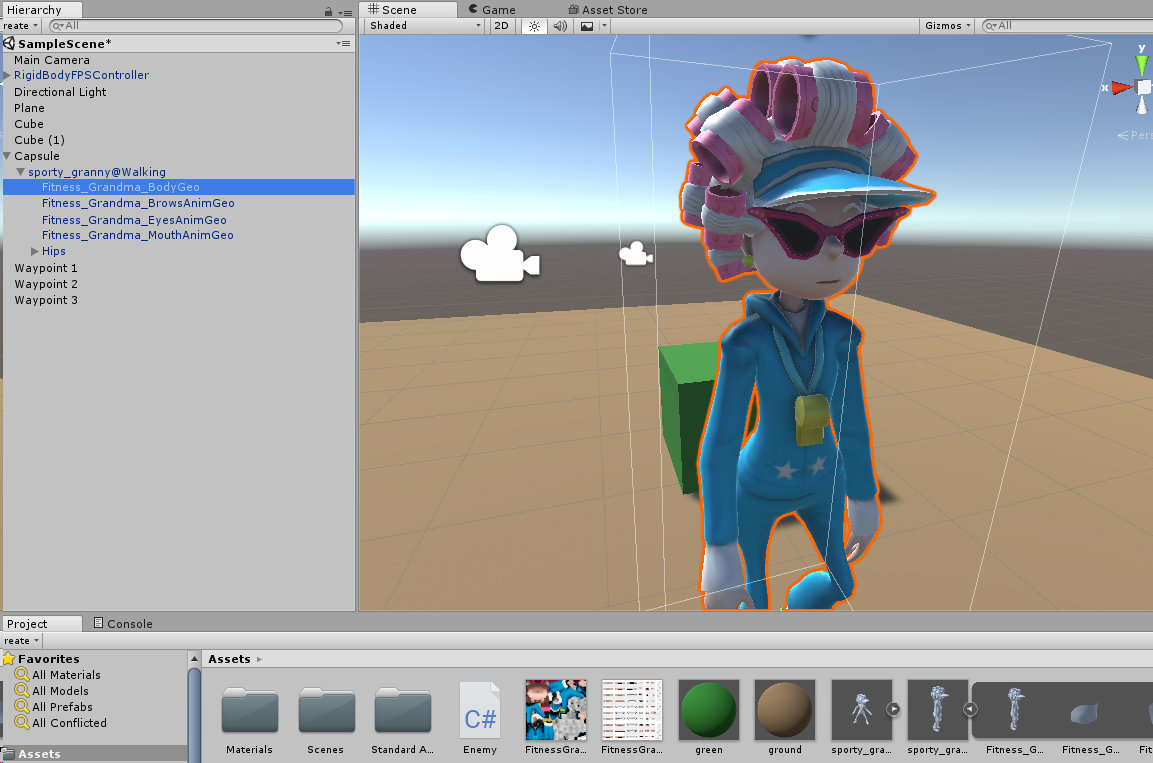
  1. Drag the enemy character model onto the Capsule to make it a child and turn off the Mesh Renderer on the Capsule
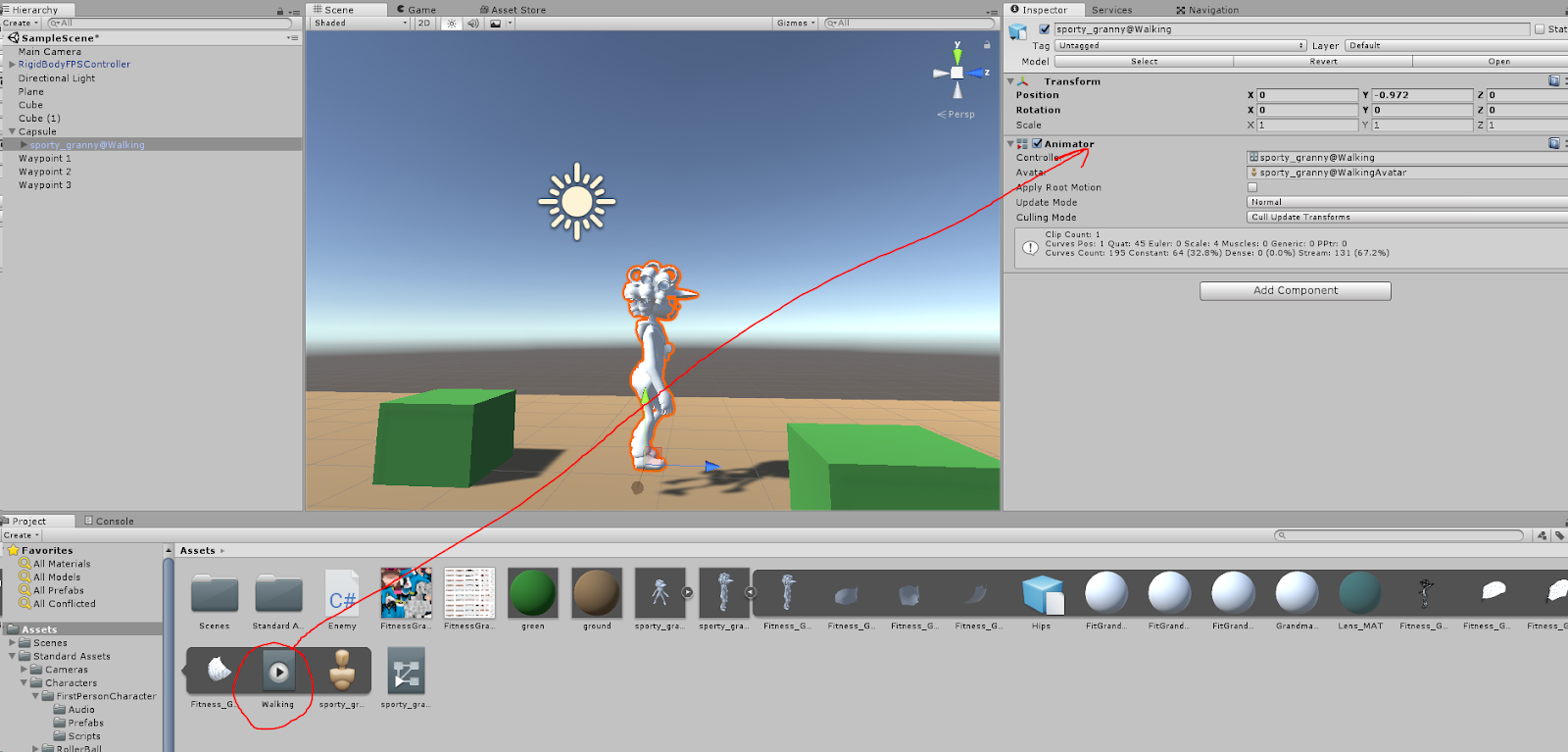
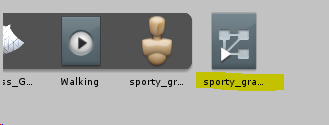
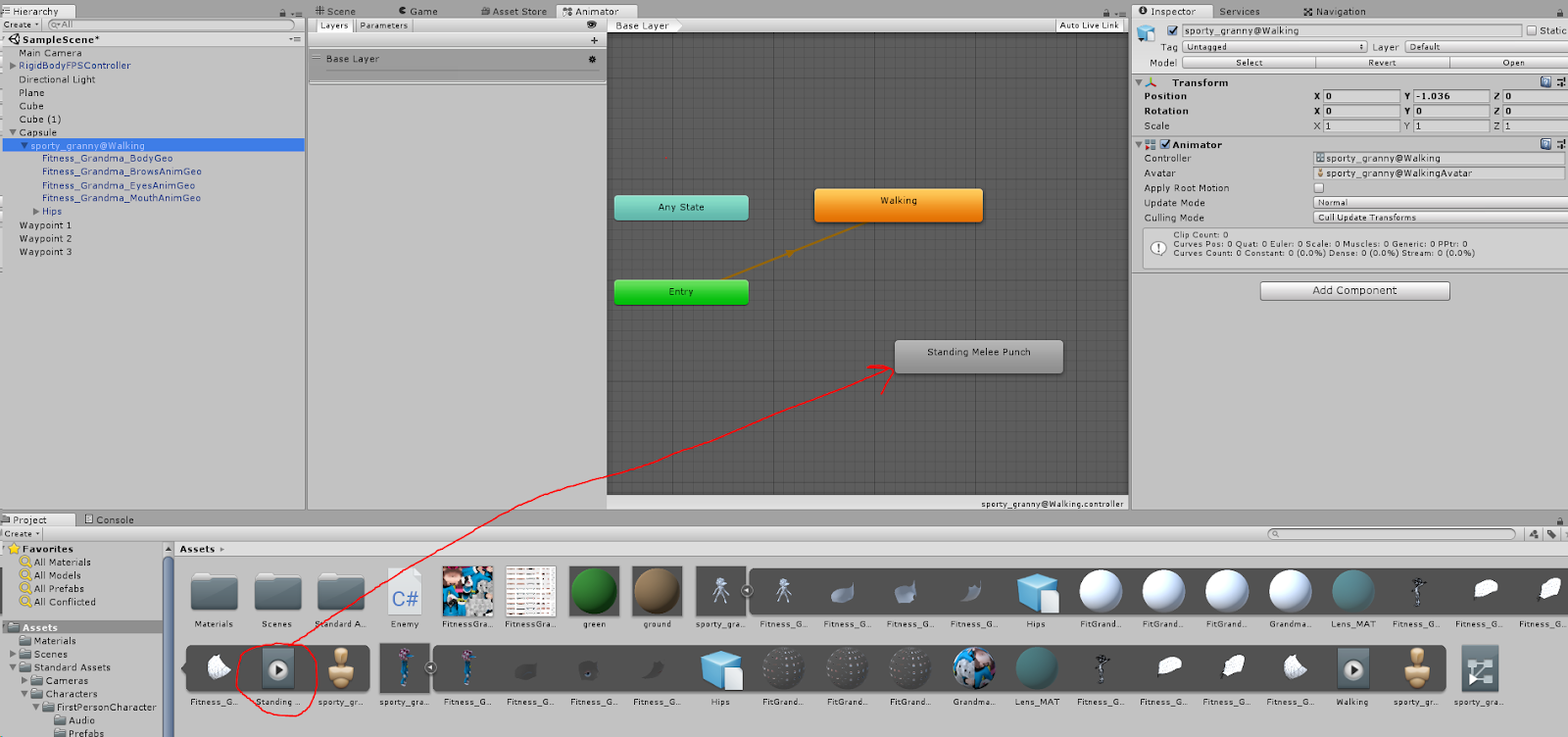
  2. Select the enemy character model in the scene and drag the Walking animation onto the Animator component

    Note that it creates an Animator Controller in your project folder when you do this
  3. Apply the textures to the character Geo
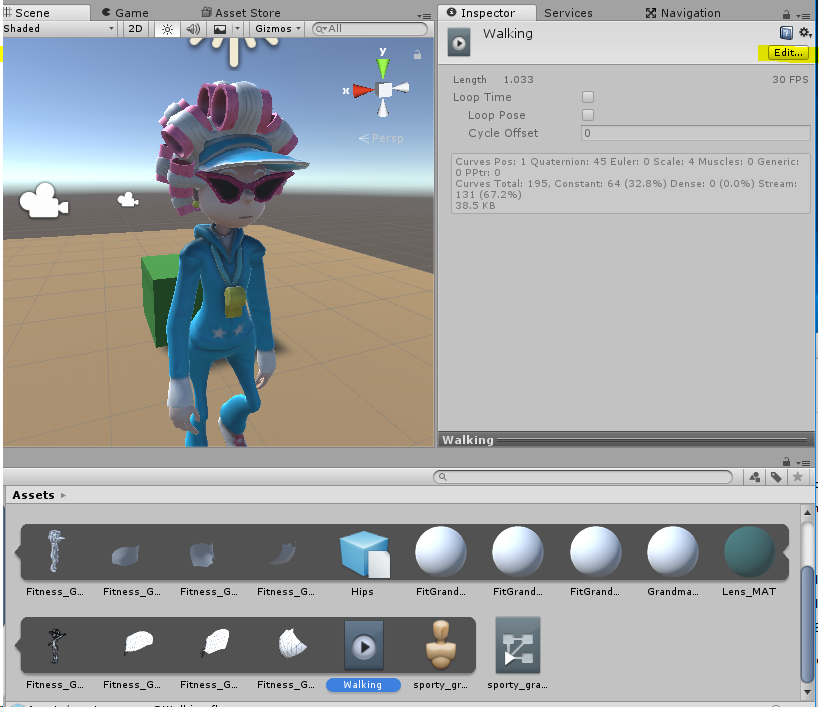
  4. Select the walking animation and choose Edit
  5. Check the box for Loop Time and Apply
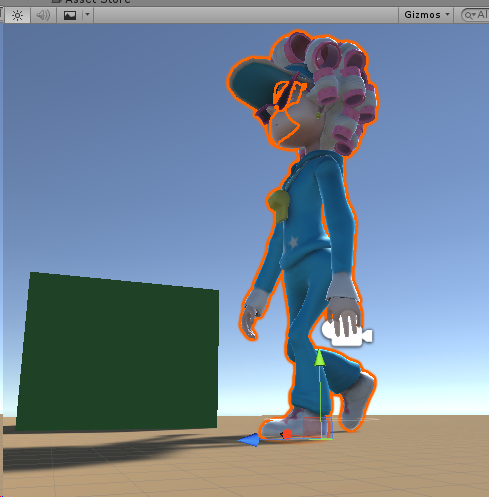
  6. Test again to see the character walking along the patrol path. While testing, check to ensure the character’s feet are making contact with the ground
Script Enemy Vision and Attack Trigger
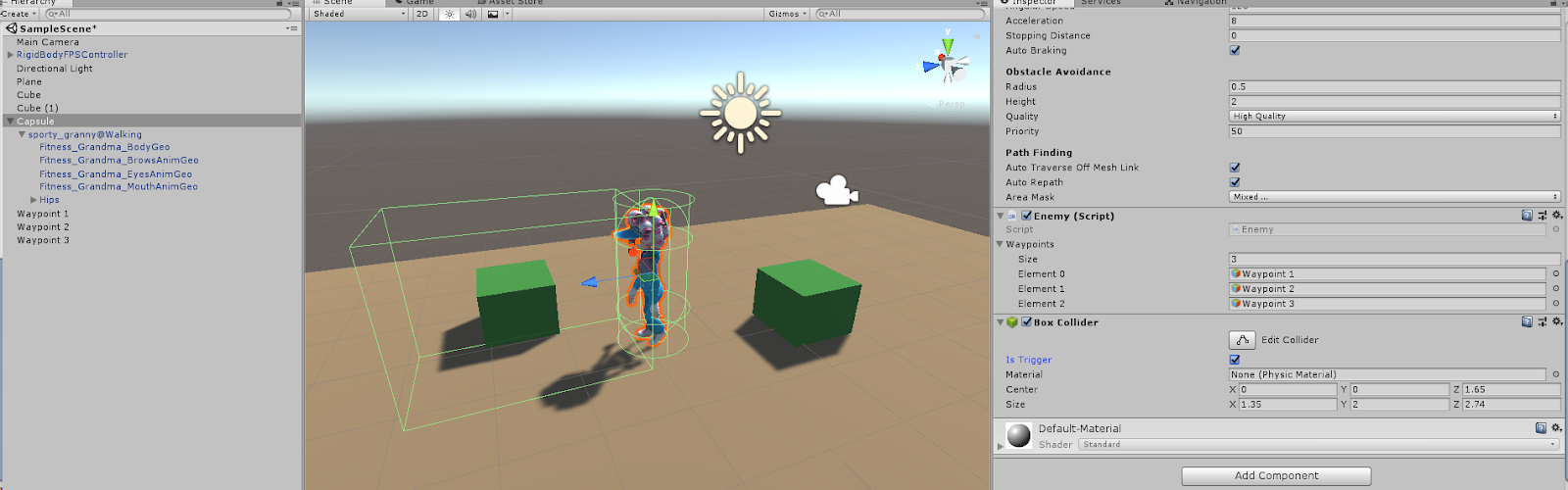
  1. Attach a Box Collider component to the enemy Capsule and mark it as Is Trigger and position and scale it to represent the view area of the enemy
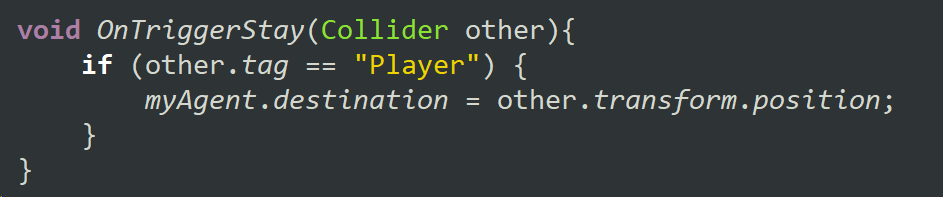
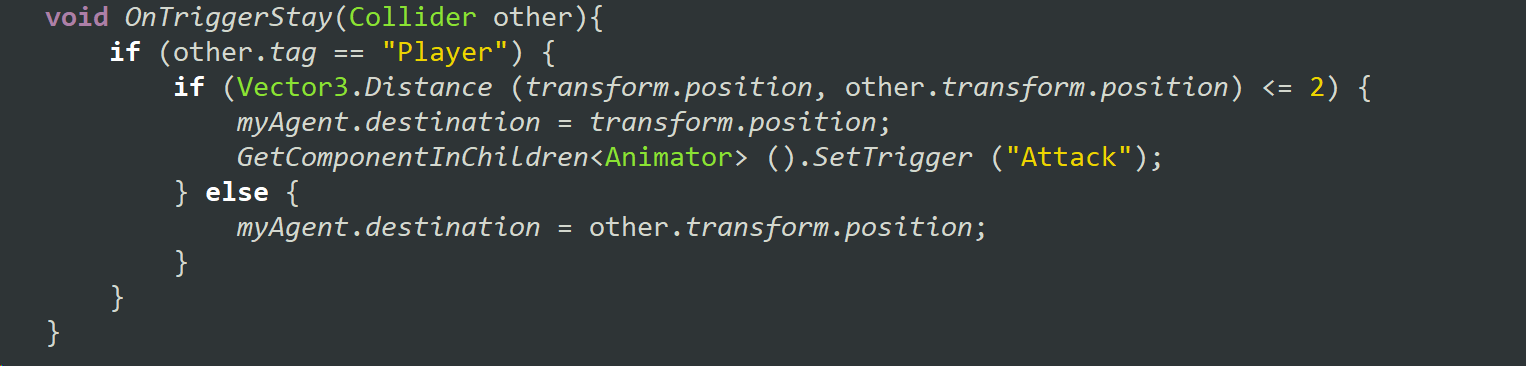
  2. Add an OnTriggerStay function to your Enemy script to check for the Player character
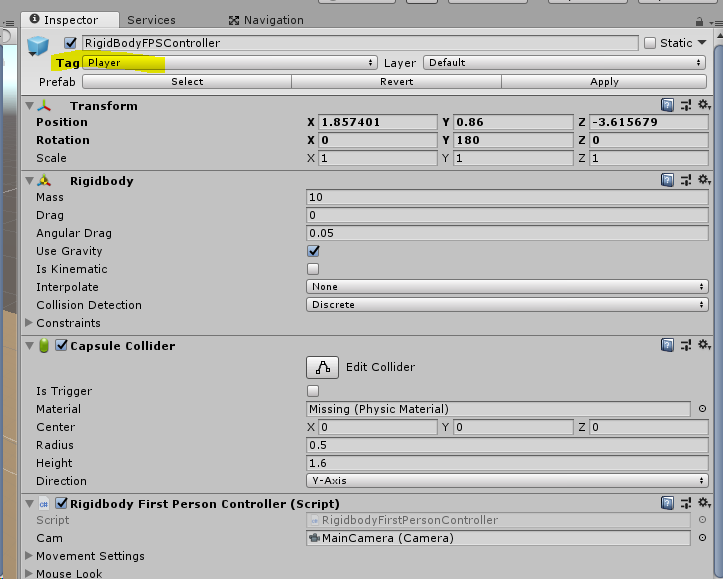
  3. Be sure to tag the player as Player
  4. You may want to expand your play space to test this new functionality, be sure to rebake the NavMesh if you do
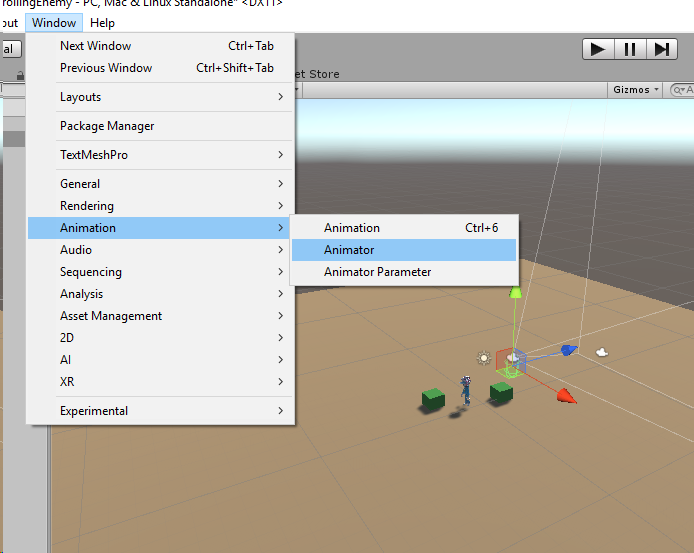
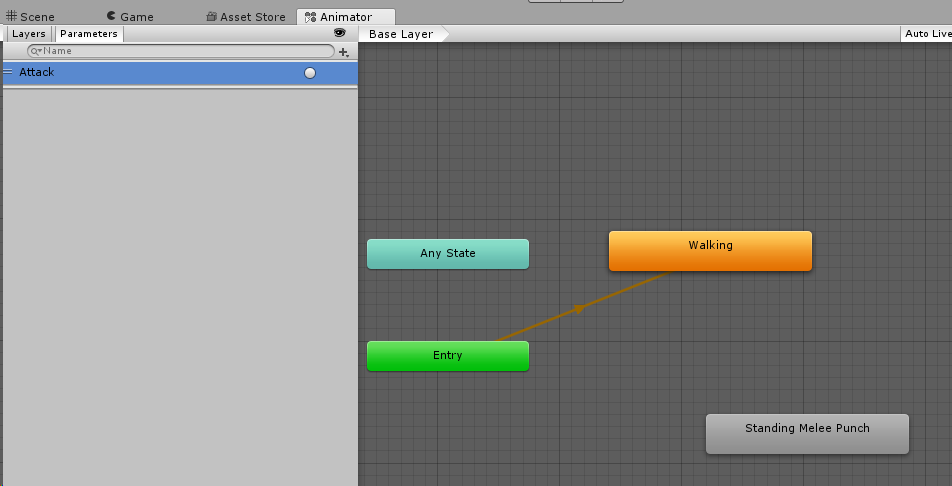
  5. Open the Animator wind from Window > Animation > Animator
  6. Select the animated enemy character and drag the Attack animation into the Animator
  7. On the Parameters tab make a new Trigger called ‘Attack’
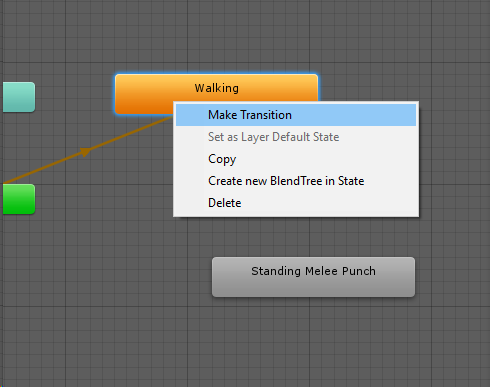
  8. Right click on the Walking animation and make a transition to the Attack animation
  9. Make a corresponding transition from the Attack to the Walking animation
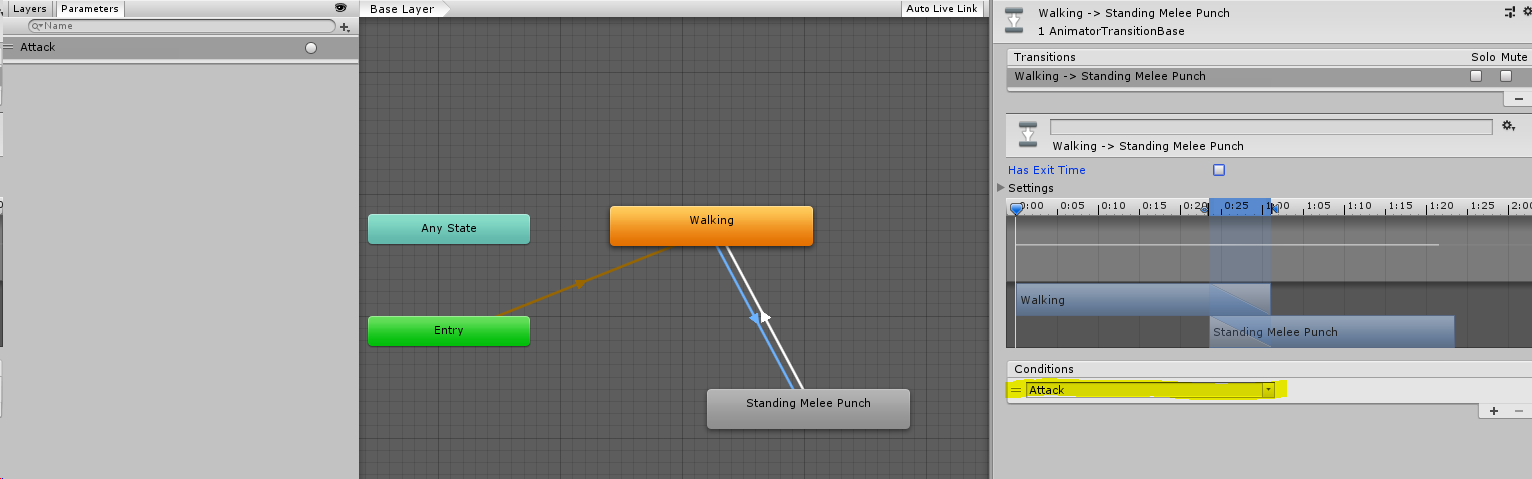
  10. Select the transition to the Attack and add a condition for the Attack trigger you made before and uncheck the box for Has Exit Time
  11. If the enemy is within range of the player, set the target destination to the enemy’s current position and trigger the attack animation, otherwise use the player’s position as the destination
Summary
After completing these steps, you should have a patrolling character that will interrupt it’s patrol to follow the player if the player gets in her view range, and if the enemy gets close enough to the player while following she will attack. If the player gets out of the view range of the enemy she will return to her patrol.

Thanks for reading, and if you've found this tutorial helpful I hope you will subscribe here and on my Youtube channel: www.youtube.com/c/AstireGames

Sunday, August 27, 2017

Game AI: Non-Human Behavior Part 5

This is part 5 of a series on Game AI for Non-Human Behavior. Here's what you might have missed!
Part 5 will be a deep dive into sensory input, and resulting behaviors.

Source: Atari
In 2015 there was an article published in nature that used Atari 2600 games to explore Reinforcement Learning in AI. Reinforcement Learning is the process of allowing AI to explore different options and learn behavior through a reward system, as opposed to Supervised Learning where AI performing sub-optimal behavior is explicitly corrected. The article, "Human-level control through deep reinforcement learning," examines sensory input used to understand the surrounding environment. In their research, the sensory input used correlates to visual input (or sight), allowing the AI to look at the pixels that make up the current game state.

Source: The Hunt, Netflix
In contrast, these blind catfish living in underwater caves have adapted to survive completely without sight. When one sense fails, we rely on honing our other senses to adapt to a world without the missing sense.

Source: https://askabiologist.asu.edu/echolocation
As children, we learn the five senses as sight, sound, smell, taste, and touch. These are the senses we as humans understand, because these are the senses we experience. However, there are other senses present in nature that are outside our area of experience. Bats, for example, use sonar in place of sight to determine the positions of things around them.


A "sense" is defined as a system of a group of cell types that responds to specific physical phenomena, which correspond to a particular region of the brain that interpret those signals. Some plants have specialized cells which detect gravity, allowing the plants to grow upright with their roots growing down into the earth.

Source: http://www.defenders.org/sharks/basic-facts
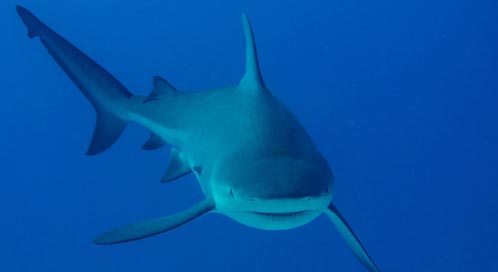
Even with senses we understand, such as smell, non-human creatures have far superior uses of them in many cases. Sharks can determine the direction a smell is coming from based on which nostril received the scent first.

Source: nature.com/scientificamericanmind/journal/v19/n4/images/
scientificamericanmind0808-22-I1.jpg
Though the focus of reinforcement learning is on changing behavior based on rewards, it relies on information about the environment being interpreted through senses. We can see something similar happen in the classic rat maze example - the hungry rat is placed in a maze that has a piece of cheese at the end and allowed to explore the maze until it finds the cheese. The rat is then placed back at the start of the maze, and this continues until the rat manages to navigate the maze perfectly. The cheese in this example is obviously the reward, but the rat needs a way to understand its environment in order to get the reward.

Source: http://www.smithsonianmag.com/smart-news/
were-terrible-distinguishing-real-and-fake-schools-fish-180953162/
Beyond just understanding the environment, the senses also allow organism to understand the creatures around them, resulting in group-based behavior like flocking. To put flocking in simple terms, we can use an algorithm that uses cohesion, alignment, and separation to simulate behavior well enough for gameplay purposes.

Source: http://harry.me/blog/2011/02/17/neat-algorithms-flocking/
Each agent in the AI flock will calculate it's desired vector of movement based on cohesion (the need to stay within in the group), alignment (the need to face the same direction as the group), and separation (the need to avoid hitting other members of the group). The calculation for cohesion is to look at the position of your neighbors within a specific range, find the center of mass, and move towards that center of mass. For alignment, the agent looks at the direction each of its neighbors is facing and aligns itself to the average. For separation, the agent will check to see if it is too close to any of its neighbors, and adjust accordingly. The three of these combined into the agent's velocity vector will result in a simple flocking behavior.

Source: https://www.gizmodo.com.au/2014/03/
what-happens-when-you-throw-four-sharks-into-a-giant-school-of-fish/
However, the flock's simple behavior may be disrupted by the presence of predators, causing the agents to need to assess their environment beyond just the position and orientation of their neighbors.

Source: https://www.wired.com/2011/12/
the-true-hive-mind-how-honeybee-colonies-think/
Bees are another wonderful example of teamwork behavior. Pheromones are special scented chemicals that allow some organisms to communicate information with each other via scent. Bees use pheromones the share information through the hive, resulting in a hive the essentially thinks together as if it were a brain with each bee acting as a neuron. I can imagine a similar system that could be used to have a group of friendly characters so coordinated that they act as a hive of bees with the player as their queen.

If you have enjoyed this series on AI for non-human behavior, please follow and subscribe!

Sunday, August 20, 2017

Game AI: Non-Human Behavior Part 3

This is part 3 of a series, if you are just joining in be sure to start at part 1!

Nature is weird, and full of constant surprises.There are a lot of things in nature that we still don't understand.Take for example these thousands of circles in the Kalahari desert:

Source: Africa, Netflix
We don't know what causes them...Scientists have suggested numerous options - but ruled all of them out - including poisonous plants, insects, and magnetism. There is so much about our planet that is outside of our understanding, and so much to draw inspiration from.

Source: Bill Nye the Science Guy 
People think science is pretty cool, that's why we have a large chunk of the entertainment industry using science to draw in their audience. As game developers, we can use that fascination to our advantage, to get our players excited.

Source: Niche, Game
I've been playing a game recently called Niche where the player controls a herd of animals and tries to help them survive. The game does some really interesting things with reproduction and genetics, allowing the player to alter the chances of certain traits, and choosing which animals will mate with each other. This game does a really great job of taking elements of nature and science that people find fascinating, and then turning those elements into engaging gameplay mechanics.

Source: Factorio, Game
Another game that I think does a great job with this is Factorio. In Factorio, the player plays as a character stranded on an alien planet, and the player needs to collect resources to build a rocket to get off the planet. A lot of the resources can't be used as raw materials, so the player builds a lot of different kinds of processing plants, essentially creating an entire factory from scratch. But the alien species living on the planet does not want to see their beautiful planet destroyed by pollution and over-harvesting. The more the player builds and expands, the more of the natural planet gets destroyed, and the angrier the aliens become. The aliens will attack the player and the base, because they are defending their planet. I really like the way this game makes you think about how your actions are impacting nature, and finding more sustainable and less invasive ways to do things is more challenging but helps keep you at peace with the creatures inhabiting the planet.


I've design characters and AI for a handful of games, and I've learned a few lessons from the process. Instinctively, it might seem that character design, combat, and behavior are all distinct design challenges that can be handled independently, but I've found that when it comes to the player interacting with the characters, these three things are very tightly intertwined, and they deserve to be designed together. There are games that have characters that just make sense because their character design feels perfectly aligned with their AI behavior, and the transition from behavior to combat seems completely natural and expected for how that character is perceived. On the other hand, I'm sure we've all played games where a character feels out of place, their behavior does not make sense for what that creature is, and the transition to combat feels clunky and unexpected.


I personally have fallen into this trap, and I'd like to think that I learned from my mistakes, and hopefully you can too. The very first game I worked on where I designed the AI and combat was a co-op exergame where two players work together to defeat giant robot spiders in an underground subway system.

We spent a lot of time designing and researching the exercise portion, and not a lot of time thinking about our enemies. We knew we needed something that would be immediately recognized as evil, we needed the player to be able to attack from a distance, and we wanted the enemies to swarm the player. A couple of interesting things that came from our design was that the spiders would come out of webs in the corners, so players could predict where they would come from, and some spiders could attack from a distance by spitting sticky webs at the player to temporarily trap them.

This project was over 5 years ago. I was the lead designer on this project so I was responsible for designing engaging enemies, but it was my first time designing anything related to AI, so I treated the character design, AI behavior, and combat completely separately, because I didn't know any better. I took the easy route - enemies were mainly different in their health and how much damage they could do, with the exception of the web-spitting spiders, and the only distinction for the boss was that she was huge and much stronger than the little minions, but no interesting differences and no narrative reason why there was one enormous spider surrounded by a horde tiny spiders.


Why are they robot spiders? What made them? The spiders are pretty scary, but their creator is probably pretty terrifying. Why are they attacking the player? Blood lust? Or are they defending their nest? Perhaps seeing a mother spider with an egg sac could help shed some light on their behavior. If I could go back and do it again, I would begin by considering why are these characters here, and what is their incentive to attack the player. I would also draw inspiration from nature to come up with more interesting behavior instead of run in and attack.

Source: The Hunt, Netflix
Spiders are bizarre but highly specialized hunters, with unique features and behavior adapted to any environment they live in.

Source: The Hunt, Netflix
This is a Portia Spider hunting another spider by dropping down on it from above. The Portia Spider specializes in hunting other spiders, so rather than building her own web she goes out on the hunt.

Source: The Hunt, Netflix
 This is a Spitting Spider that shoots poison out of its mouth at its prey. And this Spitting Spider could end up being a meal for Portia.

Source: Africa, Netflix
And here is a spider that is cartwheeling down a hill to escape a predator. Spiders are an amazing example of how their actual behavior in nature is probably more profound and well-designed than anything we could come up with when brainstorming a spider-based character for a video game. This world has wonders and terrors beyond our wildest imagination.

Source: Image By Jon Richfield
 If you are concerned that spiders are just not large enough in real life to inflict the kind of terror you are looking for, then allow me to present to you the Huntsman spider which can get up to one foot in diameter, and can move nearly a meter per second. That sounds pretty terrifying to me.

In part 4 I'm going to talk about modes of hunting (and avoiding being hunted) that can be found in nature.